How to Upgrade Your Gaming PC on a Budget (UK 2026)
Advertisement
You do not need a new PC. A single, well-chosen upgrade can transform your gaming experience for a fraction of the cost of a full build. The average UK gamer spends over £800 on a new system — but the right used component, slotted into what you already have, can deliver the same leap for under £200.
This guide is built for UK gamers in 2026. You will learn how to diagnose what is actually holding your PC back, which upgrade to buy first, how to buy it used to save 40–60%, and when an upgrade is not worth it. No guesswork, no wasted money.
If you are building from scratch instead, start with our full build guide: cheap gaming PC build UK 2026. If you want the broader picture on buying second-hand components safely, read: how to buy used PC parts in the UK.
Diagnose your bottleneck first
The most common mistake in PC upgrading is buying the wrong component. Before you spend a single pound, you need to identify what is actually limiting your performance. Upgrading a part that is not the bottleneck is the fastest way to waste money.
Open a game you play regularly. While it is running, check your usage with a monitoring overlay. Here is how to read the results:
GPU bottleneck
GPU usage at 99–100%, CPU at 40–60%. You see FPS drops in graphically demanding scenes, especially at higher resolutions. Open-world games and ray-tracing titles are the clearest indicators.
→ Upgrade your GPU
CPU bottleneck
CPU usage at 90%+, GPU at 50–70%. You experience stuttering, frame-time spikes, and drops in CPU-heavy games like strategy titles, cities builders, and multiplayer shooters with high tick rates.
→ Upgrade your CPU
RAM bottleneck
Less than 16 GB of RAM, or running a single stick (single-channel). Check Task Manager while gaming — if RAM usage consistently hits 90%+, or you see hitching when alt-tabbing, your memory is the limit.
→ Upgrade your RAM
Storage bottleneck
Long load times, texture pop-in, and games installed on a mechanical HDD. This does not affect FPS directly, but the experience improvement from moving to an SSD is dramatic — especially in open-world titles.
→ Upgrade to an SSD
Free tools for diagnosing bottlenecks
- MSI Afterburner overlay — shows GPU and CPU usage, temperatures, and frame times in-game. The best free tool for real-time monitoring.
- Task Manager (Performance tab) — quick check for RAM usage and CPU thread utilisation. Already installed on every Windows PC.
- UserBenchmark — free synthetic benchmark that compares your components to expected baselines. Useful for spotting underperforming parts.
Spend ten minutes monitoring before you spend any money upgrading. The diagnosis determines everything that follows.
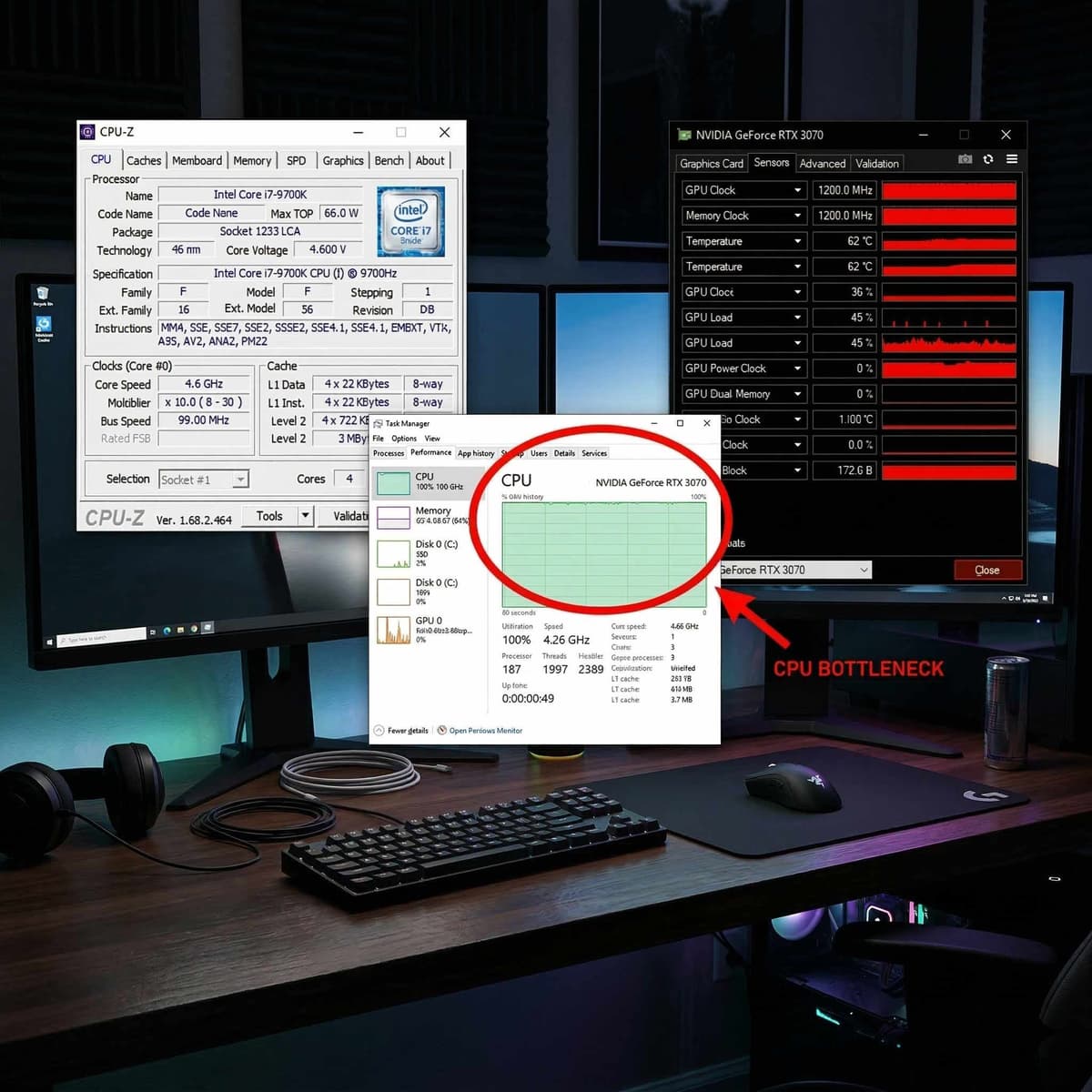
Ten minutes of monitoring saves hundreds of pounds in wasted upgrades.
The upgrade priority order (ranked by impact per pound)
Not all upgrades are equal. The best budget PC upgrade strategy is to target the component that gives you the biggest performance jump for the least money. Here is the definitive ranking for UK gamers in 2026, based on real-world pricing and performance gains.
GPU (Graphics Card)
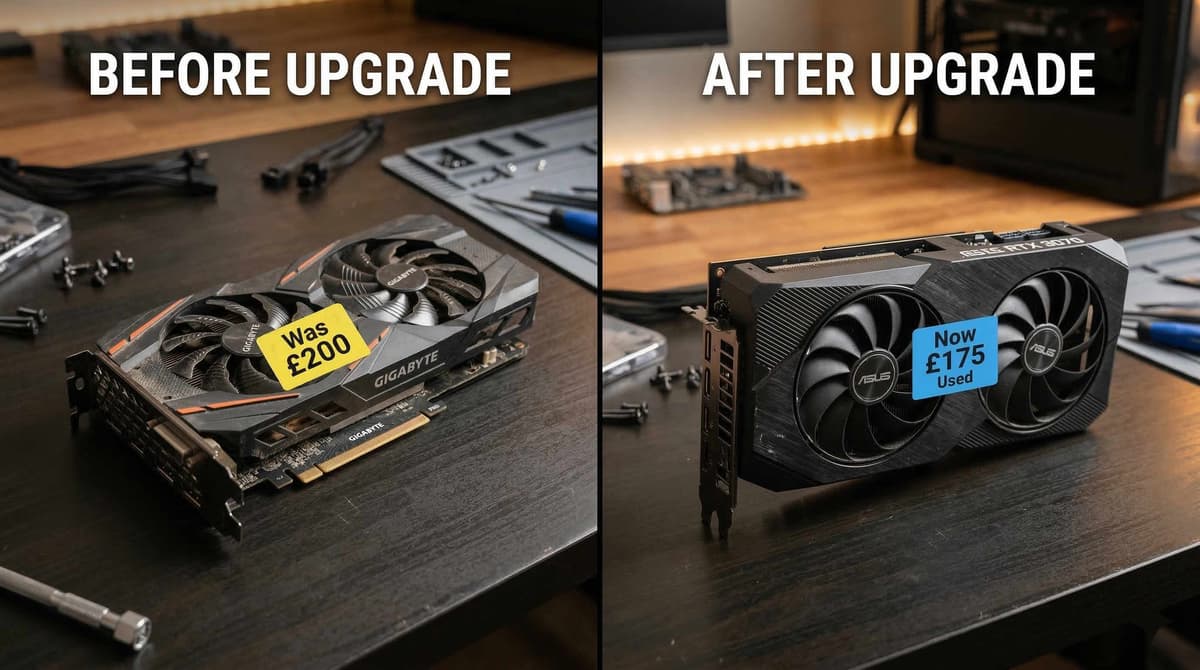
The single most impactful upgrade for gaming performance. A used RTX 3070 sells for £180–£210 on the UK used market and completely transforms 1080p gaming — delivering 100+ FPS in most titles at high settings. At 1440p, it remains competitive with medium-high settings. No other upgrade comes close to this performance-per-pound ratio.
Learn how to buy safely: buy a used GPU in the UK | how to test a used GPU
RAM (Memory)
Going from 8 GB to 16 GB, or from single-channel to dual-channel, eliminates hitching and stuttering in modern titles. Used DDR4 RAM costs just £15–£25 for a 16 GB kit. It is the cheapest meaningful upgrade you can make, and the improvement is often noticeable within minutes of installing it.
Buying guide: how to buy used RAM in the UK
SSD (Storage)
Moving from a mechanical HDD to an NVMe SSD is night and day for load times. Games that took 60 seconds to load now take 8–12 seconds. Windows boots in under 15 seconds. A 500 GB NVMe SSD costs £20–£30 new, making this the only upgrade where buying new is often cheaper than buying used. It does not boost FPS, but it dramatically improves the feel of your entire system.
CPU (Processor)
Only upgrade the CPU if you have confirmed a CPU bottleneck using the diagnosis above. CPU upgrades are trickier because they often require a new motherboard and RAM too (a "platform swap"), which turns a cheap upgrade into an expensive one. However, if you are on a compatible platform like AM4, a drop-in CPU swap can be transformative — see the platform section below.
Buying guide: how to buy a used CPU in the UK
PSU (Power Supply)
Only relevant if your current PSU cannot handle a GPU upgrade. A used RTX 3070 needs a 600W PSU minimum. If your PSU is under that, you will need to upgrade it first — but this is a compatibility requirement, not a performance boost. A reliable 650W unit costs £30–£45 used.
Best budget upgrades by current platform
Your upgrade options depend on what you already have. Here are the practical, tested upgrade paths for the most common UK gaming PC platforms in 2026. Every price listed is based on typical UK used market values.
AM4 (Ryzen 3000 / 5000 series)
Best value platform for upgrades in 2026
AM4 is the sweet spot for budget upgraders. If you are on a Ryzen 3600 or similar, dropping in a Ryzen 5 5600X (£70–£85 used) gives you a massive single-threaded leap with zero motherboard changes. Pair it with a used RTX 3070 (£180–£210) and you have a machine that handles 1080p and 1440p gaming with ease.
This is the single best performance-per-pound upgrade path available to UK gamers right now. The Ryzen 5600X is a drop-in upgrade on B450 and B550 motherboards (BIOS update may be required on older B450 boards).
LGA 1200 (Intel 10th / 11th gen)
GPU upgrade only — CPU swaps rarely worth it
If you have an i5-10400F or i7-10700, your CPU is still adequate for most gaming. The practical upgrade here is GPU only — an RTX 3070 or RTX 3060 Ti is the move. CPU upgrades within LGA 1200 (e.g. to an 11700K) offer minimal gaming gains and are not worth the cost.
LGA 1700 (Intel 12th / 13th gen)
Already strong CPUs — focus on GPU tier
12th and 13th gen Intel CPUs (i5-12400F, i5-13600K, etc.) are more than capable for 2026 gaming. Your bottleneck is almost certainly the GPU. If you are running a weaker card, step up to an RTX 3080 (£230–£270 used) or RTX 4070 (£350–£400 used) depending on budget.
AM5 (Ryzen 7000 series)
Newest platform — unlikely to need CPU upgrade
AM5 is AMD's current platform. If you built on AM5, your CPU is almost certainly not the bottleneck. Focus entirely on GPU tier. If you are running a mid-range card, an RTX 4070 Ti or RX 7900 XT used will unlock higher resolutions and ray tracing.
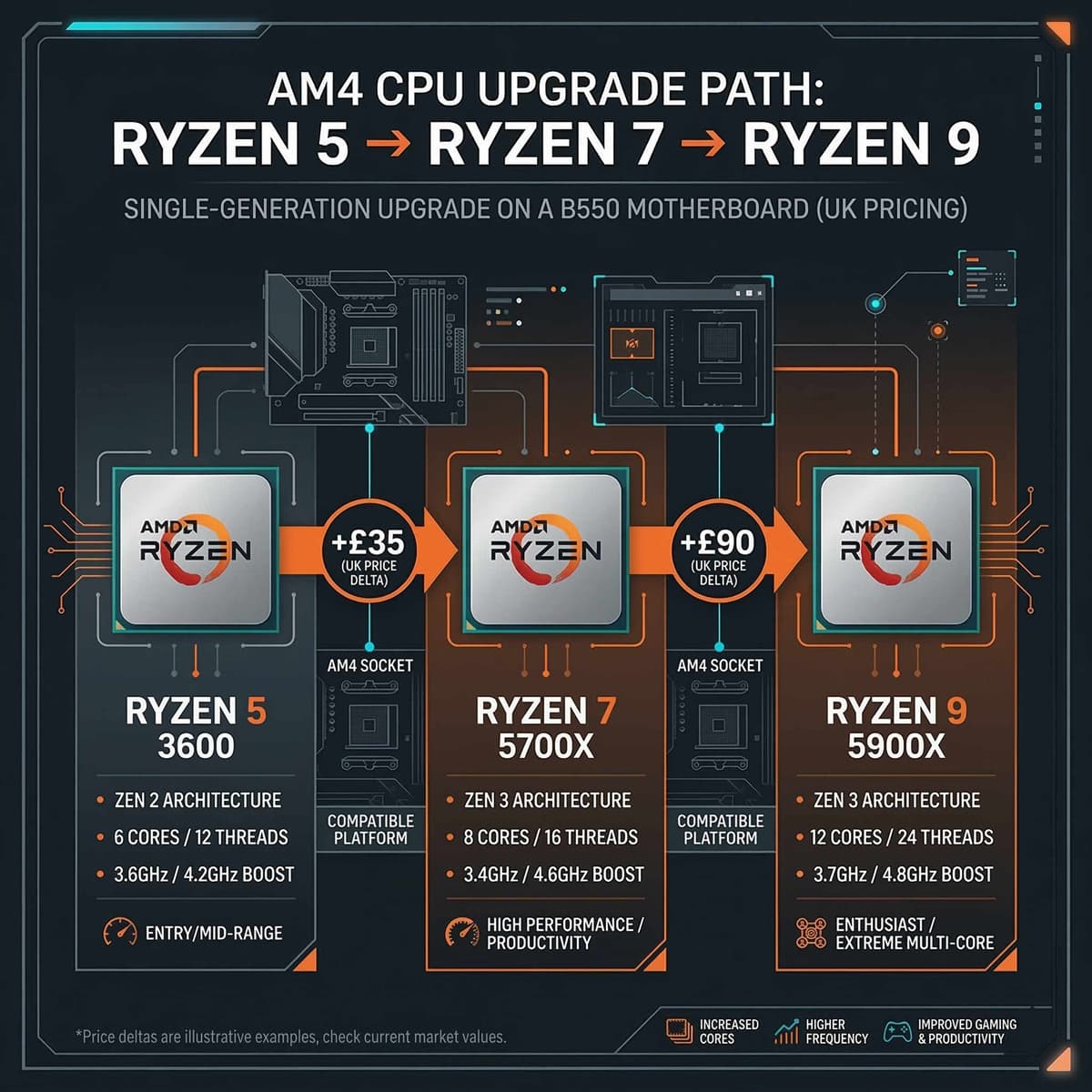
Your platform determines which upgrades are drop-in and which require a full swap.
Buy used to save 40–60%
Every component in the upgrade priority list can be bought used, and in most cases, you should. The UK used PC parts market in 2026 is mature, well-stocked, and offers extraordinary value. Here is what the savings look like:
| Component | New price (UK) | Used price (UK) | Saving |
|---|---|---|---|
| RTX 3070 | £380–£420 | £180–£210 | ~50% |
| Ryzen 5 5600X | £130–£150 | £70–£85 | ~45% |
| 16 GB DDR4 | £35–£45 | £15–£25 | ~50% |
| 650W PSU | £60–£75 | £30–£45 | ~45% |
None of these components wear out quickly under normal gaming use. A GPU that has been gamed on for two years still has years of life left. RAM is essentially eternal if it works. The silicon does not degrade — the price does.
How to buy each component used, safely
- GPUs: Complete UK used GPU buying guide — covers inspection, red flags, and arrival tests.
- CPUs: How to buy a used CPU online in the UK — covers socket compatibility, thermal paste, and testing.
- RAM: How to buy used RAM in the UK — covers speed matching, compatibility, and dual-channel setup.
For a general overview of what is safe to buy used and what is not: which PC parts are safe to buy used.
The “sell old, buy used” strategy
This is the most powerful budget upgrade technique, and most people overlook it. The idea is simple: sell your current component, then put that money towards a better used one. The net cost of a major upgrade drops dramatically.
Real example: GPU upgrade for £75 net
For £75 out of pocket, you get a card that is roughly 30–40% faster at 1080p and significantly more capable at 1440p. That is the best £75 you can spend on gaming.
This works for every component, not just GPUs. Sell your old 8 GB RAM kit for £8–£12 and put it towards a 16 GB kit. Sell your old CPU and put it towards a better drop-in replacement. The used market is a cycle, and smart upgraders use it in both directions.
If you are ready to sell your current GPU, read our complete guide: how to sell a used GPU in the UK. For general selling tips across all components, see: the complete Koukan seller guide.
When NOT to upgrade (build new instead)
Upgrading is not always the right answer. There are situations where the cost of incremental upgrades exceeds the cost of starting fresh. Here is when you should stop upgrading and consider a new build:
Signs that upgrading is not worth it
- •Your CPU is 4+ generations old AND you also need a GPU upgrade. At that point, you need a new CPU, motherboard, and possibly RAM — a platform swap that approaches new-build territory.
- •Your motherboard only supports DDR3 RAM. DDR3 systems are too old for modern gaming GPUs to perform well.
- •Your PSU is under 500W with no 8-pin GPU power connectors. You would need a new PSU, GPU, and potentially a case.
- •The total cost of planned upgrades exceeds £350–£400. At that point, a complete used budget build may offer better overall performance.
If you fall into any of these categories, a full budget build is likely the smarter investment. Our guide covers exactly how to do it: cheap gaming PC build UK 2026.
The practical threshold is this: if you need to upgrade three or more major components (CPU + motherboard + GPU), you are no longer upgrading — you are rebuilding. Plan accordingly.
Frequently asked questions
What is the best budget gaming PC upgrade in 2026?
The best budget gaming PC upgrade in 2026 is a used GPU. A used RTX 3070 costs £180–£210 in the UK and delivers the largest single performance jump for gaming. If you are on AM4, pairing it with a used Ryzen 5 5600X (£70–£85) gives you a complete transformation for under £300 total.
Should I upgrade GPU or CPU first?
Upgrade your GPU first in almost every case. The GPU is the primary determinant of gaming frame rates. The only exception is if you have confirmed a CPU bottleneck through monitoring — where your CPU runs at 90%+ while your GPU sits below 70%. Use MSI Afterburner to check before deciding.
Is upgrading an old PC worth it?
It depends on how old. If your PC supports DDR4 and has a modern CPU socket (AM4, LGA 1200, LGA 1700, or AM5), upgrading is almost always worth it and dramatically cheaper than building new. If your system uses DDR3 or a CPU socket older than AM4/LGA 1151, a full rebuild likely makes more sense.
Can I put a new GPU in an old PC?
Yes, in most cases. Any PC with a PCIe x16 slot (which includes virtually every desktop from the last 15 years) can physically accept a modern GPU. The real constraints are PSU wattage (you need enough power) and potential CPU bottlenecking (a very old CPU will hold back a powerful GPU). Check your PSU rating and run the bottleneck diagnosis above before buying.
What is the cheapest way to improve gaming performance?
The cheapest meaningful upgrades are: adding a second RAM stick for dual-channel (£10–£15 used), moving your games to an SSD (£20–£30 new for 500 GB), or upgrading from 8 GB to 16 GB of RAM (£15–£25 used). For a larger impact, a used GPU upgrade is the best pound-for-performance investment.
How do I know if my PC is worth upgrading?
Check two things: (1) does your motherboard support DDR4 or DDR5 RAM, and (2) does your CPU socket allow a meaningful upgrade? If yes to both, your PC is worth upgrading. If your system is on DDR3 or a dead-end socket with no better CPUs available, consider a budget build instead.
Ready to upgrade?
Every upgrade component mentioned in this guide is available on Koukan — the UK's marketplace for used PC parts. Browse GPUs, CPUs, RAM, and storage from verified sellers with buyer protection.
Browse upgrade components on Koukan
Used GPUs from £80 · Used CPUs from £30 · RAM kits from £12 · Free to list, safe to buy.
Related guides: buy a used GPU · buy a used CPU · buy used RAM · test a used GPU · sell your old GPU · are used GPUs worth it? · which parts are safe to buy used · budget build guide
Advertisement