Buy Used RAM in the UK: DDR4 vs DDR5 and What to Check (2026)
Advertisement
RAM is one of the safest PC components to buy used. There are no moving parts, no fans to wear out, and no thermal paste to degrade. A stick of memory either works or it doesn't — and you can prove which within minutes of receiving it.
That makes second-hand RAM one of the best value upgrades for any UK PC build in 2026. But you still need to know what you're looking for. The DDR4-to-DDR5 transition is well underway, pricing varies wildly between platforms, and a small number of fake or relabelled sticks do circulate on less-regulated marketplaces.
This guide covers everything: which generation to buy, what specs actually matter, how to spot fakes, current UK pricing, and how to test your RAM the moment it arrives. If you're new to buying used PC parts in general, start with our pillar guide: How to buy used PC parts safely in the UK. For a broader look at which components are safest to buy second-hand, see: Which PC parts are safe to buy used?
Why RAM ranks as one of the safest used buys: No moving parts. No thermal compound. Solid-state silicon that either passes a memory test or fails visibly. According to industry data, RAM failure rates in normal desktop use sit below 0.5% per year — making used sticks an excellent value proposition.
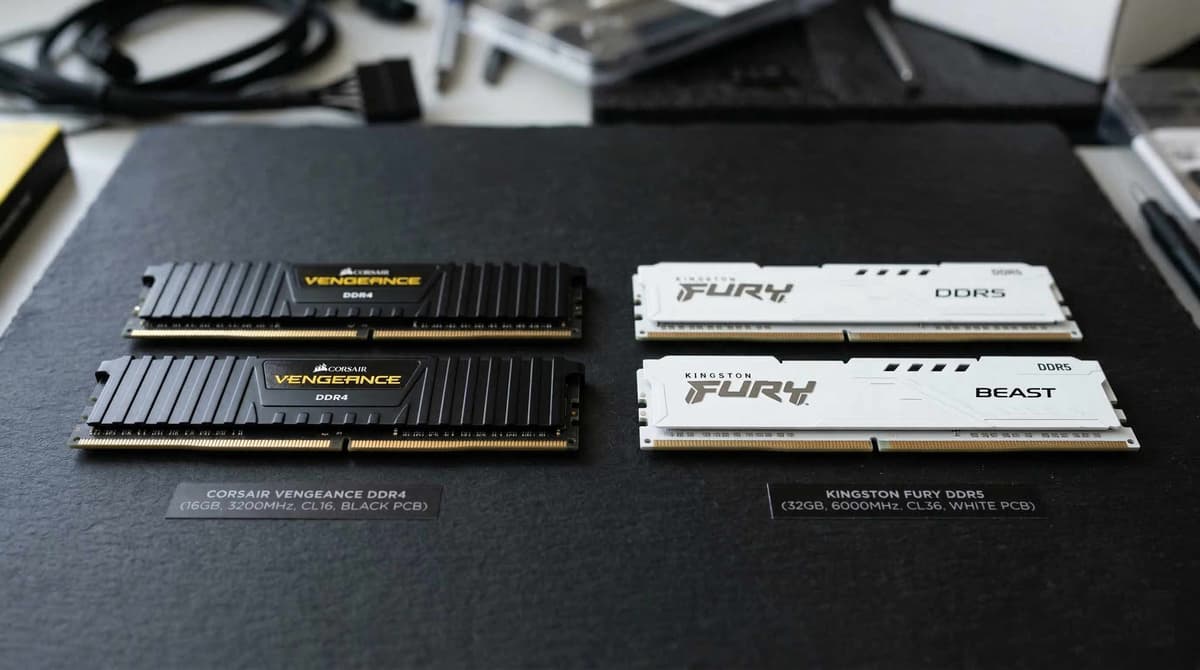
DDR4 vs DDR5 in 2026: Which Should You Buy?
The answer depends entirely on your platform. If you're building on AMD AM4 or Intel LGA 1200 (12th Gen or earlier), you're locked to DDR4. If you're on AM5 or Intel LGA 1700+ (13th/14th Gen), you need DDR5 — or in some cases can choose between both.
Here's the honest breakdown for UK buyers in 2026:
DDR4
Mature · Cheap · Abundant
- 16GB kits from £15–£25 used
- Huge second-hand supply in the UK
- Perfect for AM4 and LGA 1200 budget builds
- DDR4-3200 CL16 is the sweet spot for most users
- No real performance gains above 3600 MHz for gaming
Best for: Budget gaming builds, AM4 Ryzen systems, upgrades to existing DDR4 machines, office/productivity PCs.
DDR5
Newer · Faster · Future-proof
- 32GB kits from £45–£65 used
- Required for AM5 and most LGA 1700+ boards
- Higher bandwidth benefits content creation and AI workloads
- DDR5-5600 CL36 is the current sweet spot
- Used prices dropping steadily as adoption grows
Best for: New AM5/LGA 1700 builds, future-proofing, content creation, workstation tasks, high-refresh 1440p gaming.
The honest recommendation: If you're building a budget gaming rig under £500, DDR4 on AM4 still offers the best value in the UK market. The Ryzen 5 5600 + 16GB DDR4-3200 combination is proven, cheap, and performs brilliantly. Only go DDR5 if your motherboard demands it or you're specifically investing in a platform you plan to keep for 3+ years.
Is Used RAM Safe to Buy?
Yes — RAM is widely considered one of the safest components to buy second-hand. This is a consistent consensus across the PC building community, and there are good technical reasons for it.
Unlike GPUs that endure heavy thermal cycling, or hard drives with spinning platters, RAM modules are entirely solid-state. They operate at relatively low temperatures, draw minimal power, and have no mechanical wear mechanism. A DDR4 stick that worked perfectly for four years will almost certainly work perfectly for another four.
Why it's safe
- No moving parts whatsoever
- Low operating temperatures
- Minimal thermal degradation
- Easy to test thoroughly in minutes
- Well-known brands have lifetime warranties
- Silicon doesn't "wear out" in normal use
The real risks
- Fake or relabelled sticks (cheap no-name brands)
- Physical damage to gold contacts from rough handling
- Misrepresented speed or capacity
- Dead-on-arrival from shipping damage
- Mixed kits sold as "matched pairs"
- ECC/server RAM sold as desktop RAM
The main risk isn't that used RAM will fail — it's that you might receive the wrong thing. Fake sticks exist, especially on unregulated platforms. That's why buying from a marketplace with seller accountability matters. For a deeper dive into component safety tiers, read: Which PC parts are safe to buy used?
What to Check Before Buying Used RAM
RAM specifications can look like alphabet soup if you're not familiar. Here's exactly what matters and what you can safely ignore.
Speed Rating (MHz)
This is the clock speed of the memory. For DDR4, you'll see numbers like 2400, 2666, 3000, 3200, and 3600. For DDR5: 4800, 5200, 5600, 6000, and beyond. Higher is faster, but the real-world difference between adjacent tiers is often negligible for gaming.
- DDR4 sweet spot: 3200 MHz. Good balance of price and performance. 3600 MHz is marginally better for Ryzen CPUs but the used premium rarely justifies it.
- DDR5 sweet spot: 5600 MHz. This is where price-to-performance currently peaks. 6000 MHz kits command a noticeable premium.
CAS Latency (CL)
CAS latency measures how many clock cycles the memory takes to respond to a request. Lower is better. You'll see it written as CL16, CL18, etc. For DDR4, CL16 at 3200 MHz is the gold standard. For DDR5, CL36 at 5600 MHz is currently the value target.
Don't obsess over CAS latency for a budget build — the difference between CL16 and CL18 on DDR4 is typically 1–3 FPS in games. It matters more for competitive esports or productivity workloads.
Capacity and Stick Configuration
In 2026, 16GB is the practical minimum for gaming, and 32GB is increasingly recommended for titles like Star Citizen, Cities: Skylines 2, and heavily modded games. For productivity, video editing, or running VMs, 32GB or 64GB is worth pursuing.
- Always buy in matched pairs — 2x8GB or 2x16GB. Running dual-channel memory doubles your bandwidth compared to a single stick.
- Avoid mixing kits. Two separate 2x8GB kits from different sellers may not play nicely together, even if the specs match on paper. The underlying chips can differ.
- Check how many slots your motherboard has. If you have 2 DIMM slots, buy the capacity you need now. If you have 4, you can start with 2 sticks and add later (though matched kits are always preferable).
Brand and Authenticity
Stick to well-known brands: Corsair, G.Skill, Kingston, Crucial, and TeamGroup are all safe bets on the used market. These manufacturers use quality ICs (memory chips) and their products are well-documented — making fakes easier to spot.
Avoid no-name or unbranded RAM unless you can verify the actual chips with CPU-Z. Cheap sticks from little-known Chinese brands are the most common source of relabelled or underperforming memory.
Physical Inspection
- Check the gold contacts for scratches, corrosion, or dark spots. Light wear marks from insertion/removal are normal — heavy scratching is not.
- Look at the PCB (green/black circuit board) for cracks, burn marks, or signs of liquid damage.
- If the stick has a heat spreader, check it's firmly attached. A loose heat spreader suggests the stick has been tampered with or the adhesive has degraded.
- Ask the seller for a CPU-Z screenshot showing the SPD (Serial Presence Detect) data. This confirms the actual manufacturer, speed, and timings burned into the stick's firmware — it cannot be faked without specialist equipment.
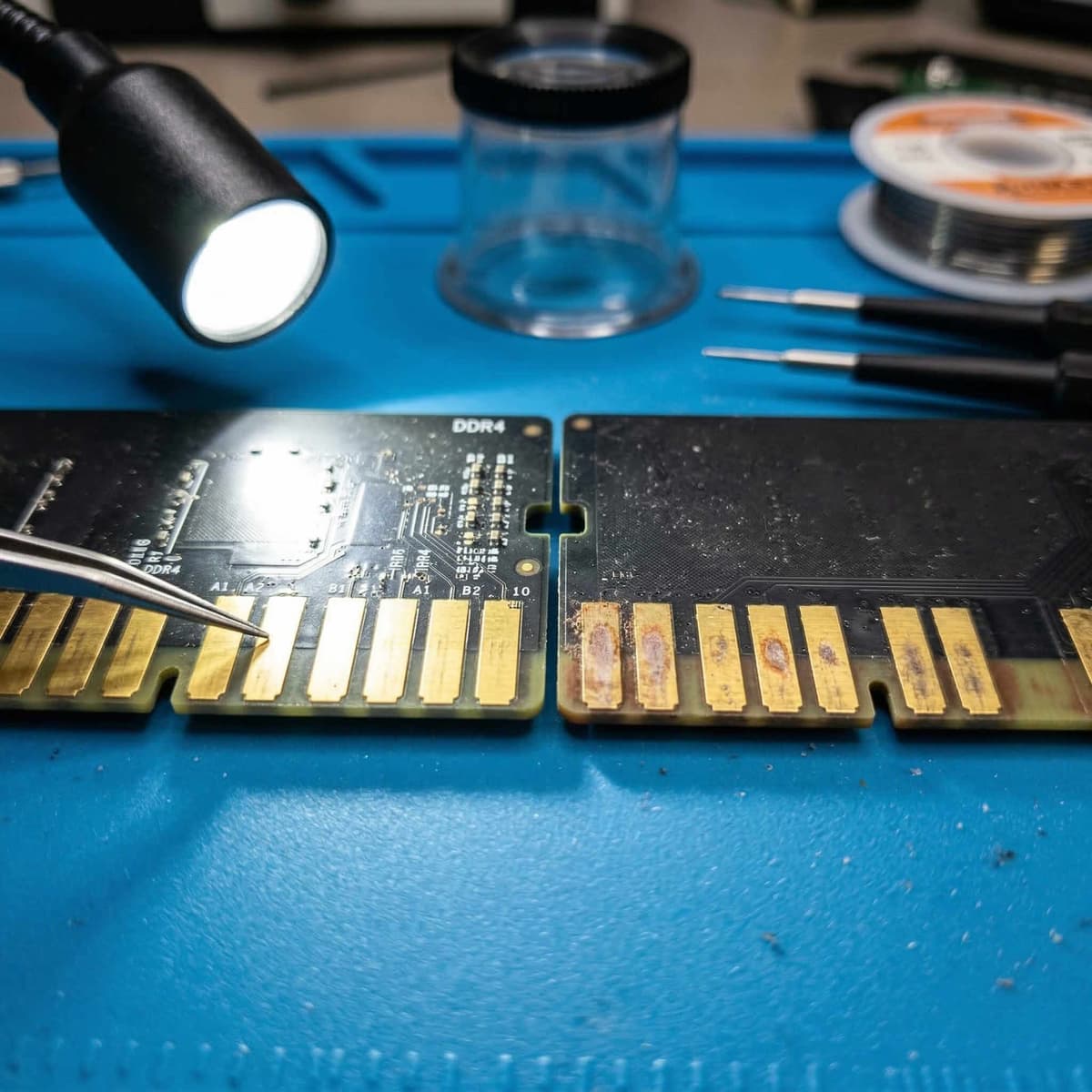
Clean gold contacts (left) vs heavy scratching that suggests rough handling.
Used RAM Prices in the UK (2026)
These are realistic sold prices for used RAM in the UK as of early 2026. Prices are based on completed sales across Koukan, eBay UK, and community forums. Expect to pay towards the lower end for bare sticks without original packaging, and towards the higher end for boxed kits from premium brands.
| Configuration | Type | Used Price (UK) |
|---|---|---|
| 16GB DDR4-3200 (2×8GB) | DDR4 | £15 – £25 |
| 32GB DDR4-3600 (2×16GB) | DDR4 | £30 – £45 |
| 16GB DDR5-5600 (2×8GB) | DDR5 | £25 – £35 |
| 32GB DDR5-6000 (2×16GB) | DDR5 | £45 – £65 |
| 64GB DDR4 (4×16GB) | DDR4 | £55 – £75 |
Prices based on completed UK sales, March 2026. Premium brands (Corsair Dominator, G.Skill Trident Z) may command 10–20% more.
Compared to new prices, used DDR4 typically saves you 40–60%, while used DDR5 saves around 25–40%. The DDR4 market is particularly favourable for buyers right now because so many people are upgrading to DDR5 platforms — flooding the second-hand market with perfectly good DDR4 kits. This is the best time in years to pick up cheap DDR4.
Where to Buy Used RAM in the UK
Not all platforms are equal when it comes to buying used memory. Here's where UK buyers should look — and what each platform is best for.
Koukan
RecommendedPurpose-built for UK PC parts. Koukan is ideal for finding matched RAM kits because sellers list specific configurations with clear specs. The PC-focused community means sellers understand what details matter — you won't find vague listings like "computer memory 16GB good condition". Integrated buyer protection means you're covered if a stick arrives dead or misrepresented.
Best for: Matched kits, specific speed/latency combos, confident transactions with PC-literate sellers.
eBay UK
Massive selection but quality varies enormously. Sort by "Sold" listings to gauge real prices. Good buyer protection via Money Back Guarantee, but returns can be slow. Watch for relabelled sticks from high-volume sellers importing cheap no-name kits. Stick to listings with clear photos and CPU-Z screenshots.
Best for: Uncommon configurations, bulk RAM, competitive bidding on well-photographed listings.
CEX
CEX offers a 24-month warranty on used RAM, which is genuinely excellent peace of mind. The trade-off: prices are typically 30–50% higher than peer-to-peer platforms. You also can't choose specific brands or speeds — you get what they have in stock. Useful as a fallback, but rarely the best value.
Best for: Buyers who prioritise warranty over price, local collection without delivery risk.
Facebook Marketplace
Hit or miss. You'll occasionally find excellent deals from local sellers clearing out old builds, but there's no buyer protection, no standardised listings, and no way to verify a seller's track record. If you can collect in person and test on the spot, it can work. For posted items, the risk is significantly higher.
Best for: Local collection bargains where you can test before paying.
For more detail on platform comparisons across all PC components, see: How to buy used PC parts safely in the UK. If you're specifically hunting GPUs, we have a dedicated guide: Buy used GPUs in the UK: Safe buying guide for gamers.
How to Test Used RAM on Arrival
Testing RAM is straightforward, but you need to be methodical. Don't just install it and assume everything is fine because Windows boots. Marginal memory errors can cause random crashes, blue screens, and data corruption that only surface under load — sometimes weeks later.
Physical inspection first
Before installing, check the gold contacts for damage, examine the PCB for cracks or burn marks, and ensure the heat spreader is secure. If anything looks off, photograph it before powering on — this protects any dispute claim.
Run MemTest86 (1–2 full passes)
Download MemTest86 (free), create a bootable USB, and boot from it. Let it run for 1–2 complete passes. Each pass takes 30–90 minutes depending on capacity. Any errors at all — even a single one — mean the stick is faulty. Do not use RAM that fails MemTest86.
Check speed and capacity in CPU-Z or Task Manager
Open CPU-Z and go to the Memory tab. Verify the capacity matches what you bought (e.g., 16GB should show as ~15.9GB). Check the frequency — remember CPU-Z shows the base clock, so DDR4-3200 displays as 1600 MHz (double it for the effective speed). Alternatively, Task Manager → Performance → Memory shows it clearly.
Enable XMP/EXPO in BIOS
Most RAM runs at its base JEDEC speed by default (e.g., DDR4-2133). To get the advertised speed, enter your BIOS and enable XMP (Intel) or EXPO (AMD). If the system is unstable with XMP enabled, the RAM may not be compatible with your specific motherboard — this isn't necessarily a fault with the RAM.
Run a stability test for 30+ minutes
After confirming the speed is correct, run a stress test like Prime95 (Large FFTs mode), OCCT, or a demanding game for at least 30 minutes. Watch for crashes, blue screens, or application errors. If it survives 30 minutes of heavy load without issues, your RAM is almost certainly fine.
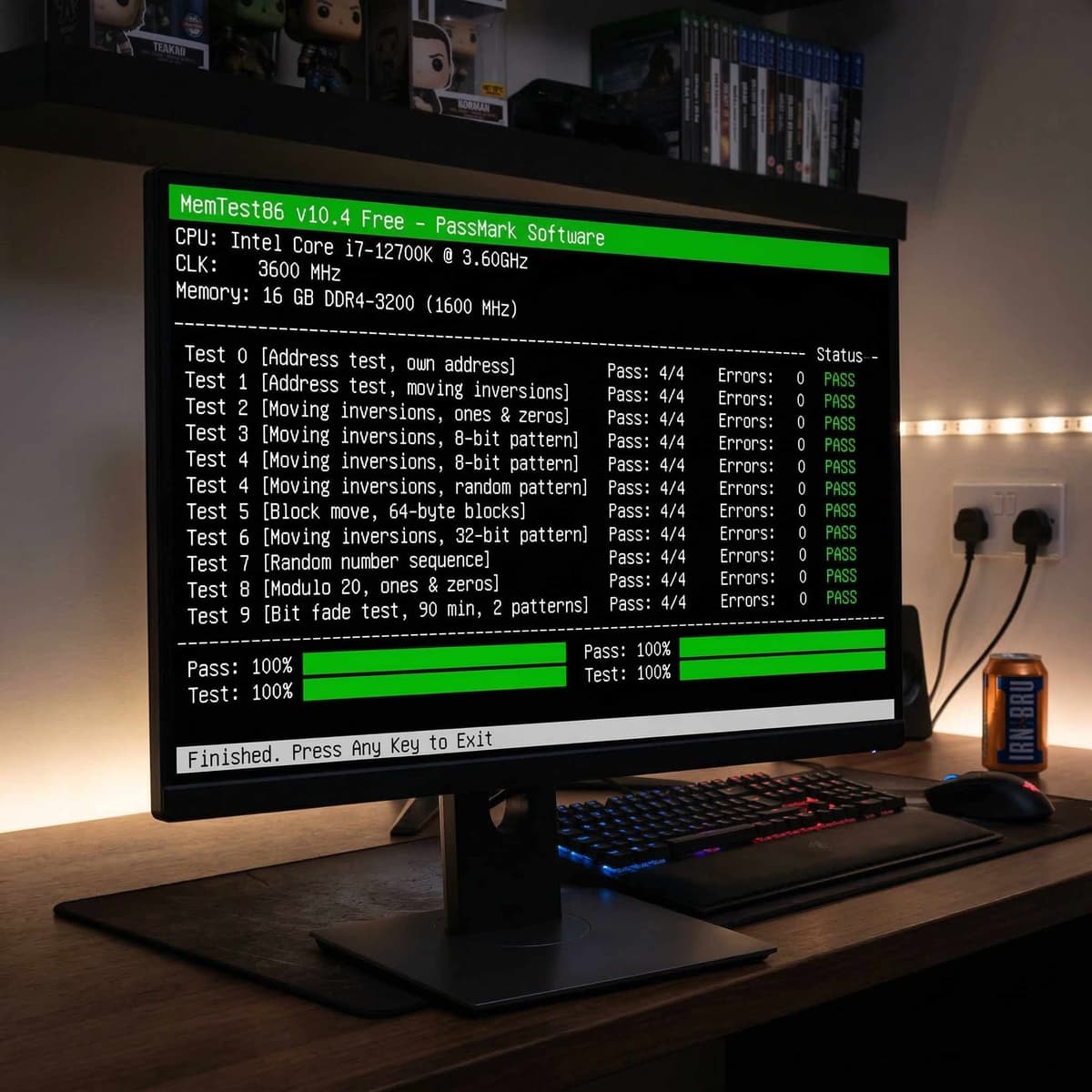
MemTest86 is the gold standard for used RAM testing. Even a single error means the stick should be returned.
Important: Test your RAM within the first 48 hours of receiving it. Most buyer protection windows (including Koukan's) require you to raise issues promptly. If you wait weeks before testing and discover a fault, your dispute options may be limited.
Frequently Asked Questions
Is it safe to buy used RAM?
Yes. RAM is widely regarded as one of the safest PC components to buy used. It has no moving parts, operates at low temperatures, and either works or doesn't — there's no slow degradation. The main risk is receiving fake or misrepresented sticks, which is easily mitigated by buying from reputable sellers and testing with MemTest86 on arrival.
How long does RAM last?
In practical terms, RAM outlasts its usefulness. Quality sticks from major brands can run for 10–15+ years without issues. You'll upgrade to a new DDR generation long before the silicon itself fails. Many people are still running DDR3 from 2012 without a single error. Used DDR4 from 2020 has an enormous amount of life left.
Should I buy DDR4 or DDR5 in 2026?
It depends on your platform. If you're building on AM4 or LGA 1200, DDR4 is your only option — and it's fantastically cheap used. If you're on AM5 or LGA 1700+, you need DDR5. Don't buy a DDR5-compatible motherboard and then try to use DDR4 — they are physically incompatible. For budget builds under £500, DDR4 on AM4 still offers the best value in the UK.
Can I mix RAM brands?
Technically, yes — but it's not recommended. Mixing brands means mixing IC (memory chip) manufacturers, which can cause instability, prevent XMP profiles from working, or force all sticks to run at the slowest common speed. For the best experience, buy a matched kit — two sticks sold together that have been tested as a pair. This is where Koukan shines, as sellers typically list complete matching kits.
How do I know if RAM is fake?
The easiest check is CPU-Z. Open the SPD tab — it shows the actual manufacturer and specifications burned into the stick's firmware. If a seller claims it's "Corsair DDR4-3200 CL16" but CPU-Z shows a different manufacturer or lower specs, it's been relabelled. Also be suspicious of: prices that are too good to be true, sticks with peeling or misaligned labels, and sellers who refuse to provide CPU-Z screenshots. Branded sticks from Corsair, G.Skill, and Kingston have distinct visual designs that are harder to replicate.
Still deciding what parts to buy used? Read our full guide: Which PC parts are safe to buy used?
Advertisement