Buy Used CPUs Online in the UK: What You Need to Know
Advertisement
If you want to buy CPU online UK, the used market can be one of the safest places to save money—if you verify compatibility and condition before you pay. A CPU has no fans, no moving bearings, and typically either works perfectly or fails fast.
This guide is UK-focused and practical: you’ll learn what to confirm (socket + chipset + BIOS support), how to spot bent pins (especially on AMD platforms), what proof to request from a seller, how the CPU should be packaged for courier delivery, and a quick test routine when it arrives.
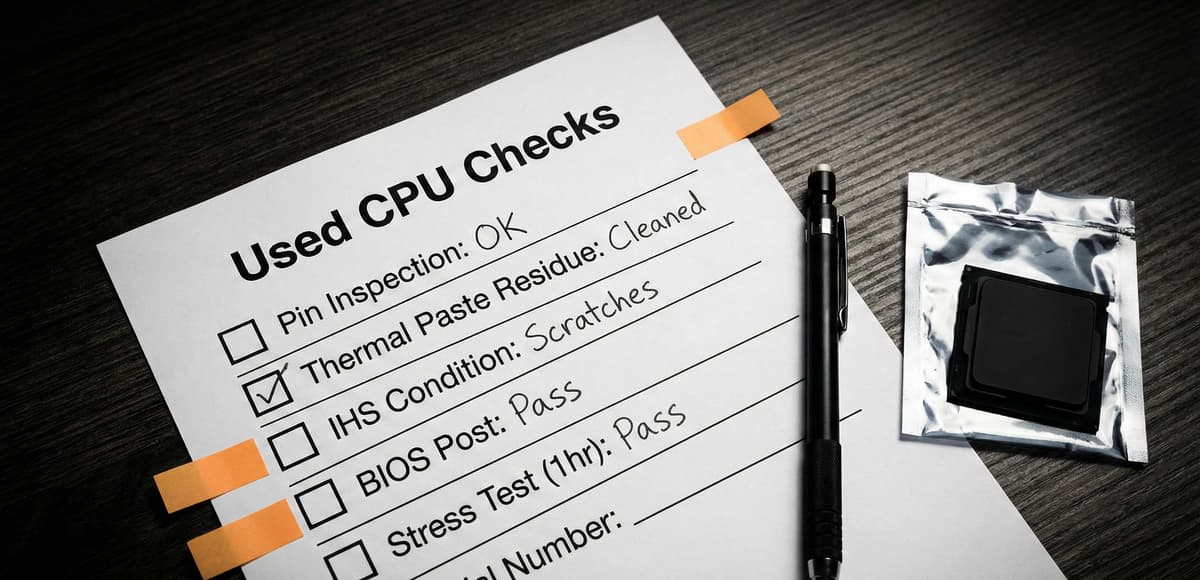
Quick view: checks that prevent most used-CPU problems.
For broader component buying advice, start here: buy used PC parts safely in the UK. If you’re considering a full build instead, see buying a second-hand PC in the UK.
The 10-point used CPU checklist (save this)
- Confirm the exact model (e.g. “Ryzen 5 5600” vs “5600G”) and whether it includes the original box/clamshell.
- Verify socket (AM4/AM5, LGA1700, etc.) and that it matches your motherboard.
- Verify chipset + BIOS support for that CPU generation (especially upgrades on older boards).
- Ask for proof: CPU-Z / BIOS screen photo showing model + clocks, plus a short video of it booting.
- Ask for clear pin/pad photos under bright light (multiple angles).
- Look for signs of rough handling: scratched contact pads, contaminated thermal paste, missing SMD components.
- Confirm it hasn’t been delidded or physically modified (unless you specifically want that).
- Require proper packaging: clamshell + padding + rigid box (no “CPU in a padded envelope”).
- Use safe payment methods with buyer protection (avoid bank transfer to strangers).
- On arrival: inspect, then run a fast stability test before leaving feedback.
Compatibility: socket, chipset, BIOS (the part that catches people out)
1) Socket must match
- AMD AM4: pins are on the CPU. The motherboard socket is holes.
- AMD AM5: pins are in the motherboard socket (LGA). The CPU has flat contact pads.
- Intel LGA sockets: pins are in the motherboard socket. The CPU has pads.
2) Chipset + BIOS support must match the CPU generation
A CPU can be the correct socket and still not boot if the motherboard BIOS is too old. Before you buy, check your board’s CPU support list and required BIOS version.
- If you’re upgrading within AM4 (for example, older Ryzen to a later generation), plan for a BIOS update.
- If the system currently doesn’t boot, you may need an older compatible CPU to flash the BIOS first.
3) Consider the rest of the platform
- RAM generation: DDR4 vs DDR5 depends on the motherboard platform, not the CPU alone.
- Integrated graphics: some CPUs have it, some don’t. If you don’t have a GPU for testing, iGPU can make first-boot troubleshooting far easier.
- Cooler compatibility: confirm mounting hardware (AM4 vs AM5) and that the cooler is adequate.
If you’re still deciding whether to buy a full system rather than a single part, compare against our second-hand PC checklist.
Bent pins and socket damage: AM4 vs AM5 (what “bad” looks like)
AM4 (pins on the CPU)
Ask for close, high-resolution photos with strong side lighting. Pins should form clean, even rows.
- One or two slightly bent pins can sometimes be corrected, but treat it as a high-risk purchase.
- Missing pins, multiple bent rows, or “crumpled” corners are hard no’s.
- Look for thermal paste contamination between pins—this can cause poor contact.
AM5 (pins in the motherboard socket)
The CPU has pads, so the bigger risk shifts to the motherboard socket pins during install. Still, you should inspect CPU pads for scratches and residue.
- Deep scratches across pads suggest sliding/dragging during installation.
- Residue on pads can cause intermittent boot issues; avoid units that look “messy”.
- Ask whether the CPU was ever dropped or transported loose without a clamshell.
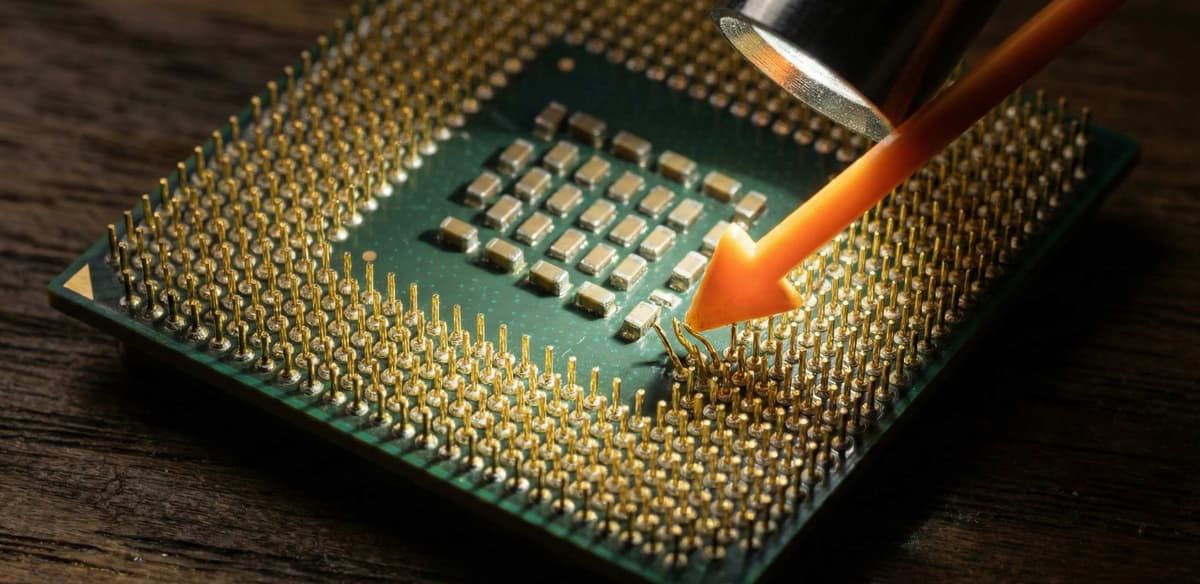
Pins/pads are where most used-CPU deals are won or lost.
Practical rule: if the seller won’t provide pin/pad photos, assume they’re hiding damage and move on.
Proof to request (simple, hard to fake)
When you buy CPU online UK, you’re buying trust. Ask for proof that ties the CPU model to a working machine.
Ask for one of these “proof bundles”
- Option A (best): short video showing BIOS screen + a CPU identification screen (e.g. CPU-Z) + a quick benchmark run.
- Option B (good): CPU-Z screenshots showing name/stepping plus a timestamp note in the photo.
- Option C (minimum): photo of the CPU in-hand + close-ups of pins/pads + a written return agreement if it’s DOA.
Copy/paste message to the seller
Copy/paste: Hi! Can you confirm the exact CPU model and share close photos of the pins/pads? If possible, could you send a short video of the PC booting to BIOS + a CPU info screen (CPU-Z) and a quick 2–3 minute benchmark run? Also, how will it be packaged for shipping (clamshell + padding + box)?
Shipping & packaging (don’t let a courier destroy a good CPU)
CPUs are small and easy to ship, but they can be ruined by poor packaging. In the UK, parcels get knocked around—packaging matters as much as the part.
What “good packaging” looks like
- CPU inside a rigid plastic clamshell (original is ideal).
- Clamshell in an anti-static bag (nice-to-have).
- Then padding (bubble wrap/foam) so it can’t rattle.
- Then a rigid outer box (not a thin mailer).
Red flags
- “I’ll wrap it in tissue / put it in an envelope.”
- No clamshell for AM4 pins.
- Loose CPU in a bag with other items.
If the seller can’t package it properly, it’s safer to buy a different listing—even if the price is slightly higher.
Quick testing after arrival (30–45 minutes)
Step 1: Inspect before you install
- Check pins/pads again under bright light.
- Confirm the heatspreader markings match the advertised model.
- Clean old thermal paste residue from edges (avoid getting anything onto pins/pads).
Step 2: First boot checks
- Boot to BIOS and confirm CPU model, temperatures at idle, and memory detection.
- Update BIOS only if needed—don’t change multiple variables at once.
Step 3: Fast stability checks
- Run a short CPU load (10–15 minutes) and watch for errors, reboots, or thermal throttling.
- Check that clocks behave normally under load (not stuck at low frequency).
- If you see crashes, re-check cooler mounting and memory settings before blaming the CPU.
If you’re sourcing multiple used components, pair this with the broader guide: buy used PC parts safely in the UK.
FAQ: buying used CPUs online in the UK
Is it safe to buy a used CPU online?
Usually yes—CPUs are among the safer used parts. The main risks are incompatibility (socket/BIOS) and physical damage (especially AM4 pins).
What proof should I ask for before I buy?
A short video showing BIOS + CPU identification (CPU-Z) and a quick benchmark is ideal, plus clear pin/pad photos. If the seller refuses, skip the listing.
How do I avoid buying the wrong CPU for my motherboard?
Match the socket first, then confirm chipset and BIOS support for that exact CPU model/generation. Don’t rely on “it’s AM4 so it fits” alone.
What packaging is acceptable for a shipped CPU?
A rigid clamshell, padded so it can’t move, inside a rigid box. Avoid envelopes and “loose in a bag” shipping.
What should I do if the CPU arrives damaged or won’t boot?
Document it immediately (photos of packaging + pins/pads). Then troubleshoot basics (BIOS version, cooler mount, RAM settings). If it’s still DOA, use the platform’s buyer protection.
Ready to shop?
The used market rewards careful buyers. If you use the checks above—compatibility first, proof second, packaging third—you’ll avoid most UK used-CPU headaches.
Browse available parts on Koukan: processors or all listings.
Reminder: this post is general guidance, not a guarantee. If something feels off—unclear photos, evasive answers, or risky packaging—walk away. There’s always another listing.
Advertisement