Used PC Parts Price Guide UK: What Everything Is Worth (2026)
Advertisement
This is the definitive UK pricing reference for used PC parts in March 2026. Whether you are selling your old components or buying someone else's, this guide tells you what each part is actually worth — not what sellers are asking, but what buyers are paying.
Every price range in this guide is based on real completed sales data from eBay sold listings, Koukan marketplace transactions, and UK hardware forums. We assume good working condition with no original packaging unless stated otherwise. A card with its original box and all accessories will sit at or slightly above the top of the range; one with cosmetic wear or missing accessories will land at the bottom.
Selling and want a step-by-step guide? Where to sell used PC parts in the UK. Buying and want to know what's safe? How to buy used PC parts safely. Pricing a GPU specifically? How much is my GPU worth?
Prices updated: March 2026. We refresh this guide monthly to reflect the latest UK market conditions. Bookmark this page and check back before any purchase or sale. Used PC parts prices in the UK shift with new product launches, seasonal demand, and eBay & marketplace trends.
Used GPU Prices UK (March 2026)
Graphics cards are the most valuable component in most gaming PCs and the one with the most volatile resale prices. The ranges below assume reference or partner-card models in good working condition. Founders Edition cards from NVIDIA and reference AMD designs occasionally command a small premium from collectors, but for most buyers the cooler brand matters less than the chip underneath.
For a deeper dive on pricing your specific GPU, see our dedicated guide: How much is my GPU worth? If you are buying, our used GPU buying guide covers exactly what to check before you pay.
NVIDIA GeForce — Used Prices
| GPU | Price Range |
|---|---|
| GTX 1660 Super | £55–£75 |
| RTX 3060 12GB | £110–£140 |
| RTX 3060 Ti | £140–£170 |
| RTX 3070 | £170–£210 |
| RTX 3070 Ti | £190–£230 |
| RTX 3080 10GB | £240–£310 |
| RTX 3080 Ti | £280–£350 |
| RTX 3090 | £380–£480 |
| RTX 4060 | £200–£240 |
| RTX 4060 Ti | £250–£300 |
| RTX 4070 | £340–£400 |
| RTX 4070 Ti | £400–£470 |
| RTX 4080 | £550–£650 |
| RTX 4090 | £900–£1,100 |
AMD Radeon — Used Prices
| GPU | Price Range |
|---|---|
| RX 580 8GB | £35–£50 |
| RX 6600 | £85–£110 |
| RX 6700 XT | £130–£165 |
| RX 6800 XT | £220–£280 |
| RX 7600 | £160–£190 |
| RX 7800 XT | £300–£360 |
| RX 7900 XTX | £500–£600 |
Market trend: RTX 30-series prices have stabilised after a long decline. RTX 40-series cards are starting to drop as RTX 50-series stock improves. AMD RDNA 2 cards (RX 6000 series) offer outstanding rasterisation value but are falling faster due to the RDNA 3 replacement cycle.
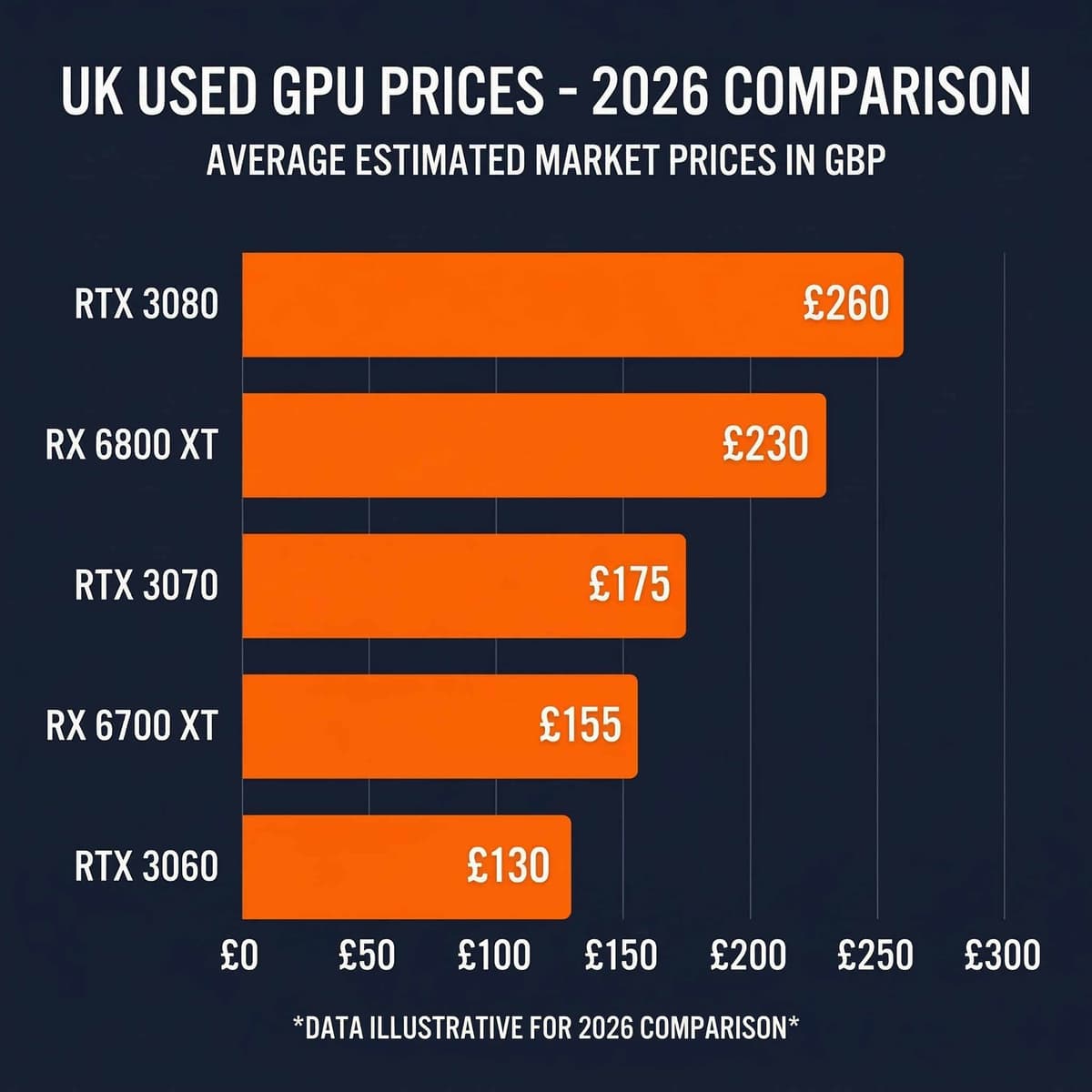
GPU pricing is the most volatile in the used PC parts market — check current listings before committing to a price.
Used CPU Prices UK (March 2026)
CPUs hold their value more consistently than GPUs. They are also one of the safest components to buy used — there are no moving parts and they either work or they do not. The key pricing factors are generation, socket compatibility, and whether the chip has a particular gaming advantage (like 3D V-Cache). For a complete buying guide, see: How to buy used CPUs online in the UK.
Intel Core — Used Prices
| CPU | Price Range | Socket |
|---|---|---|
| i5-10400F | £30–£40 | LGA 1200 |
| i5-12400F | £55–£70 | LGA 1700 |
| i5-13600K | £120–£150 | LGA 1700 |
| i7-12700K | £110–£135 | LGA 1700 |
| i7-13700K | £160–£195 | LGA 1700 |
AMD Ryzen — Used Prices
| CPU | Price Range | Socket |
|---|---|---|
| Ryzen 5 3600 | £30–£40 | AM4 |
| Ryzen 5 5600 | £50–£65 | AM4 |
| Ryzen 5 5600X | £55–£70 | AM4 |
| Ryzen 7 5800X | £80–£100 | AM4 |
| Ryzen 7 5800X3D | £140–£175 | AM4 |
| Ryzen 9 5900X | £120–£150 | AM4 |
| Ryzen 7 7800X3D | £240–£290 | AM5 |
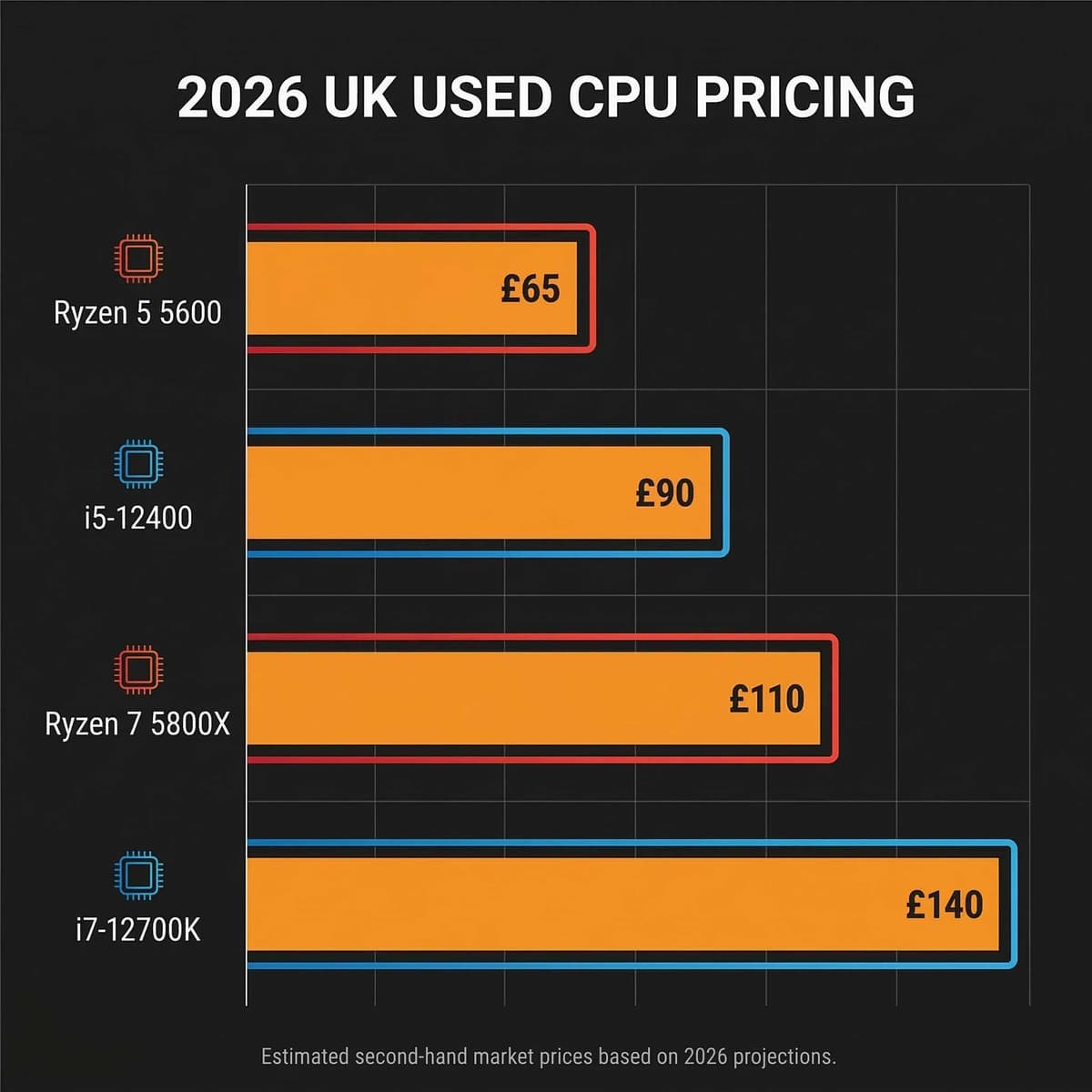
CPUs are among the safest used components to buy — always verify socket compatibility with your motherboard before purchasing.
A key pricing note for CPUs: bundles sell better. A Ryzen 5 5600 on its own fetches £50–£65, but pair it with a B550 motherboard and 16GB DDR4 and the bundle can command £120–£150 — more than the individual parts combined. If you are selling, consider bundling. If you are buying, a bundle is almost always better value.
Used RAM Prices UK (March 2026)
RAM is one of the simplest components to buy used. It either works or it does not, and it is trivially easy to test with MemTest86 or Windows Memory Diagnostic. The main variables are generation (DDR4 vs DDR5), capacity, and speed. Brand and heat spreader style barely affect pricing. For a detailed buying and testing guide, see: How to buy used RAM in the UK.
| RAM | Price Range |
|---|---|
| DDR4 8GB (single stick) | £6–£10 |
| DDR4 16GB (2×8GB kit) | £12–£18 |
| DDR4 32GB (2×16GB kit) | £22–£35 |
| DDR5 16GB (2×8GB kit) | £18–£28 |
| DDR5 32GB (2×16GB kit) | £35–£55 |
Matched kits matter. Always buy RAM in matched pairs (same manufacturer, same speed, same timings) for the best stability and performance. Mismatched sticks will run at the speed of the slowest module and may refuse to enable XMP/EXPO profiles altogether.
Used Storage Prices UK (March 2026)
Storage is cheap new, which means it is even cheaper used. The important question when buying used SSDs is the remaining drive health — ask the seller for a CrystalDiskInfo screenshot showing the total bytes written (TBW) and remaining life percentage. For HDDs, the economics rarely make sense unless you need bulk cold storage.
| Storage | Price Range |
|---|---|
| 500GB NVMe SSD | £18–£25 |
| 1TB NVMe SSD | £28–£40 |
| 2TB NVMe SSD | £50–£75 |
| 1TB SATA SSD (2.5") | £20–£30 |
| HDDs (any capacity) | £5–£15 |
Buyer tip — always ask for drive health data. A CrystalDiskInfo screenshot takes seconds to capture and tells you exactly how much life the drive has left. Any seller who refuses this request is a red flag. NVMe SSDs with over 80% remaining health are functionally as good as new.
Used Motherboard Prices UK (March 2026)
Motherboards are the hardest component to price because value depends heavily on the socket (and therefore which CPUs it supports), chipset features, condition of the socket pins, and whether the BIOS has been updated. Older sockets like AM4 and LGA 1200 are cheap but still in strong demand for budget builds. Newer sockets (AM5, LGA 1700) hold their value better.
| Motherboard | Price Range | Socket |
|---|---|---|
| B450 (e.g. Tomahawk) | £25–£40 | AM4 |
| B550 | £40–£60 | AM4 |
| X570 | £55–£80 | AM4 |
| B660 | £45–£65 | LGA 1700 |
| Z690 | £70–£100 | LGA 1700 |
| B650 | £60–£85 | AM5 |
Critical check: Always ask for a close-up photo of the CPU socket. Bent pins (Intel LGA) or damaged contacts (AMD PGA) can render a motherboard useless. If the seller cannot or will not provide a socket photo, move on.
Used PSU Prices UK (March 2026)
Power supplies are the one component where buying used requires the most caution. A failing PSU can damage every other component in your system. That said, a high-quality PSU from a reputable manufacturer (Corsair, Seasonic, EVGA, be quiet!) with a 7- or 10-year warranty can be a perfectly safe buy if the warranty is still valid. Budget and unbranded PSUs should always be avoided used.
| PSU | Price Range |
|---|---|
| 550W 80+ Bronze | £20–£30 |
| 650W 80+ Gold | £30–£45 |
| 750W 80+ Gold | £35–£55 |
| 850W 80+ Gold | £45–£65 |
Warning: PSUs are the riskiest used component. A degraded PSU delivering unstable voltages can silently damage your GPU, motherboard, and storage. Only buy used PSUs from reputable brands with long warranties, and verify the warranty is still active. Never buy an unbranded or budget PSU used. If in doubt, buy new — a £50 new PSU is cheaper than replacing a fried GPU.
Used Case & Cooler Prices UK (March 2026)
Cases and coolers are the lowest-value components on the used market relative to their new price, primarily because shipping costs eat into the savings (especially for full ATX cases). Local collection is the preferred way to buy or sell cases. Coolers — particularly AIO liquid coolers — require more caution because pump failure is the most common issue.
Cases
£15–£40
Budget cases at £15–£20. Mid-range (Meshify C, 4000D) at £25–£35. Premium cases (O11 Dynamic) up to £40. Collection only for the best value — posted cases rarely make sense after shipping costs.
AIO Liquid Coolers
£25–£50
240mm AIOs at £25–£35. 360mm variants at £35–£50. Check pump noise on arrival — a rattling or buzzing pump is near end of life. Warranty transferability varies by brand.
Air Coolers
£10–£25
Basic tower coolers at £10–£15. Premium (NH-D15, Dark Rock Pro) at £20–£25. Ensure all mounting hardware is included — missing brackets are the most common issue.
How We Determine These Prices
We do not guess. Every price range in this guide is derived from three data sources, cross-referenced monthly:
eBay Sold Listings (UK)
We filter to "Sold" items only — not active listings. Active listing prices tell you what sellers hope to get; sold prices tell you what buyers actually paid. We sample the last 30 days and remove outliers (auction snipes, obviously damaged units, and bulk lots).
Koukan Marketplace Data
Completed sales and active listings on our own platform. As a PC-parts-specific marketplace, Koukan data tends to reflect more informed pricing — both buyers and sellers know the hardware.
UK Hardware Forums & Communities
Asking prices on Reddit r/HardwareSwapUK, Discord PC communities, and other forums. These tend to run 5–10% below eBay due to the absence of seller fees.
Condition assumptions: All prices assume good working condition with no physical damage. We assume the component is sold without original packaging and without additional accessories unless stated. A GPU in its original box with all accessories typically commands 5–10% above our stated range. A component with cosmetic wear (scratches, scuff marks, discoloured thermal pads) will sit at or below the bottom of the range.

Our pricing methodology: eBay sold data, Koukan marketplace transactions, and UK hardware community asking prices — cross-referenced monthly.
Tips for Buyers and Sellers
Knowing the price is only half the equation. How you approach the transaction determines whether you end up at the top or bottom of these ranges.
If You're Buying
- Top-of-range prices typically include original packaging, all accessories, and minimal usage. If the listing lacks these, you should be paying mid-range or below.
- Always test on arrival. Run FurMark or 3DMark for GPUs, MemTest86 for RAM, CrystalDiskInfo for storage. The first 24 hours are your window to raise a dispute.
- Bundles save money. CPU + motherboard + RAM bundles are nearly always cheaper than buying each component separately. Sellers are motivated to clear entire platforms at once.
- Avoid "too good to be true" prices. If something is priced 30%+ below our ranges, it is either faulty, a scam, or incorrectly described. Proceed with extreme caution. Read our safe buying guide for detailed red flags.
If You're Selling
- Price at mid-range for fast sales. The sweet spot is the middle of our stated range. This attracts serious buyers quickly and avoids weeks of relisting. Every day a component sits unsold, it loses a little more value.
- Good photos are worth £20. Multiple clear photos in natural light, showing the component from all angles, with a timestamp or your username visible, increase trust and sale price significantly.
- Include benchmark data. A screenshot of Cinebench, 3DMark, or CrystalDiskInfo proves the component works and performs as expected. This alone justifies pricing at the top of the range.
- Factor in platform fees and dispute rules. eBay charges commercial sellers ~12.3% in fees and subjects all sellers to 30-day automated forced returns. Facebook Marketplace is free but has zero protection for electronics. Koukan charges 0% seller commission — you keep 100% of your asking price with secure 48-hour escrow protection. See our seller guide for a full platform comparison.
Check Current Prices on Koukan
This guide gives you the ranges — but real-time prices shift daily. Browse the Koukan marketplace to see what UK sellers are listing right now, compare with our ranges above, and buy or sell with confidence. Zero seller fees. PC-parts specialists only.
Prices last updated: March 2026. This guide is refreshed monthly. For component-specific guides, see: sell a used GPU · buy a used GPU · buy a used CPU · buy used RAM
Advertisement