Buying a Used Motherboard in the UK: Safety Checklist & Best Picks
Advertisement
Of all the used PC parts you can buy in the UK, the motherboard carries the highest failure risk. Unlike a GPU or RAM stick, a faulty board can silently corrupt your data, refuse to POST entirely, or only show its damage weeks after arrival. Done right, though, picking up a quality used motherboard saves you £60–£100 over new — and the best second-hand AM4 and LGA1700 boards are still excellent platforms in 2026.
This guide walks you through exactly what to ask before you buy, a 12-point pre-purchase checklist, the best used boards available right now on the UK market, and the tests to run the moment your package lands on the doorstep. For the broader context on buying used parts safely, see our pillar guide: How to buy used PC parts safely in the UK. And if you're building a budget gaming rig, check our cheap gaming PC build guide for 2026.
Why used motherboards fail (and what causes it)
Motherboard faults aren't always obvious at a glance. Here are the five most common failure modes you'll encounter in second-hand listings:
VRM damage from sustained overclocking
The Voltage Regulator Modules (VRMs) deliver power to the CPU. Boards that have been heavily overclocked — especially budget boards pushed beyond their design spec — can suffer burned or degraded VRM components. Symptoms range from instability under load to complete failure to POST.
BIOS corruption
A failed BIOS update, a power cut mid-flash, or simply years of power cycling can leave a board stuck in a boot loop or unable to detect storage. This is often fixable with a BIOS recovery USB, but not always — and it's a red flag in a used purchase.
Bent or damaged CPU socket pins
On AMD AM4 boards, the pins live in the motherboard socket rather than the CPU. A single bent pin can mean a dead CPU lane, no-boot conditions, or random instability that's nightmarish to diagnose. Always request a clear, torch-lit photo of the socket.
Dead RAM or PCIe slots
Repeated installation and removal, incompatible high-speed RAM, or general wear can kill individual RAM slots or PCIe lanes. A board sold as "working" might boot fine with one RAM stick in slot A2 but fail with two sticks or in XMP.
Liquid cooling leaks
AIO and custom loop coolant on a motherboard is often invisible in photos. Corrosion or short circuits from leaked coolant can cause gradual or sudden failure months later.
The 12-point pre-purchase checklist
Before you transfer a single penny, run through this list. A good seller won't hesitate — they'll have the answers ready.
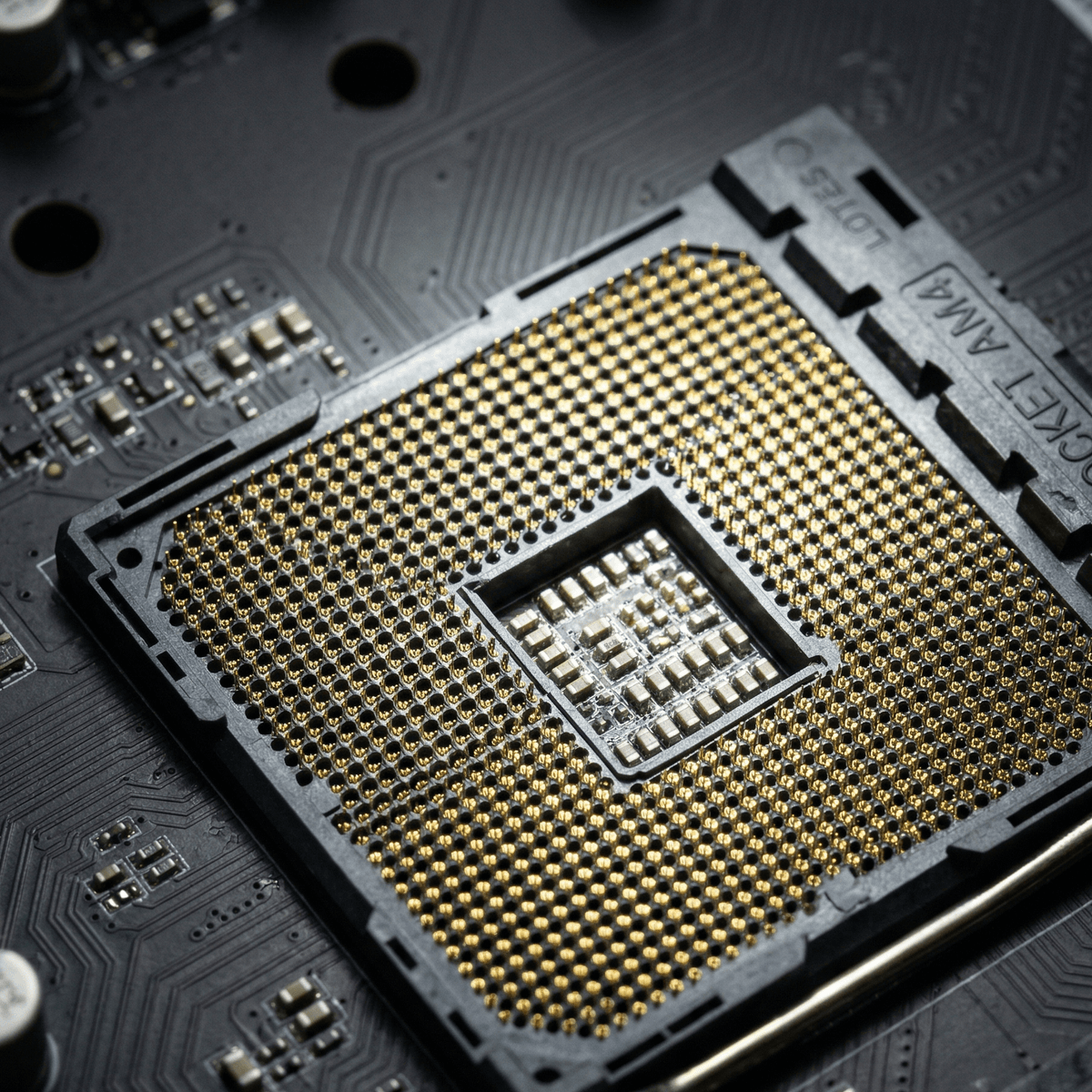
Request a torch-lit macro photo of the CPU socket — bent pins are your biggest single risk.
- Ask for a BIOS POST photo or video. The board should boot to the BIOS screen with the CPU, RAM, and storage detected. A live video clip is best — it's hard to fake.
- Confirm all USB ports work. Ask for a quick demo or note in the listing description. Loose or dead USB ports are common after heavy use.
- Ask if it was ever overclocked. VRM stress is cumulative. Even if the board "works fine", knowing its history lets you calibrate your risk.
- Confirm the PCIe x16 slot works with a GPU installed. Some boards will POST without a GPU but fail once one is installed due to a damaged PCIe lane.
- Confirm all M.2 slots have been tested. Ask which M.2 slots have been used and whether SSDs were detected without issue.
- Request a torch-lit photo of the CPU socket (no bent/missing pins). On AM4 boards especially, zoom in and count any anomalies. One bent pin is a negotiation point at minimum; several is a hard no.
- Check the CPU socket retention lever isn't broken or stuck. A damaged lever means you can't safely seat or remove the CPU.
- Ask for a CPU-Z system screenshot. This shows the exact CPU, memory speed, and channel configuration — confirming the board ran at spec.
- Ask if there's any history of liquid cooling leaks on or near the board. Look for discolouration or corrosion near VRM heatsinks and fan headers in photos.
- Check the power delivery phases look intact. VRM chokes and MOSFETs should look uniform and unmarked — no burns, no cracked components.
- Look for capacitor bulge near the CPU socket area. Bulged caps (domed tops instead of flat) indicate heat stress or age-related failure.
- Confirm the last successful boot date. "Tested and working last month" is very different from "worked fine 2 years ago before I upgraded".
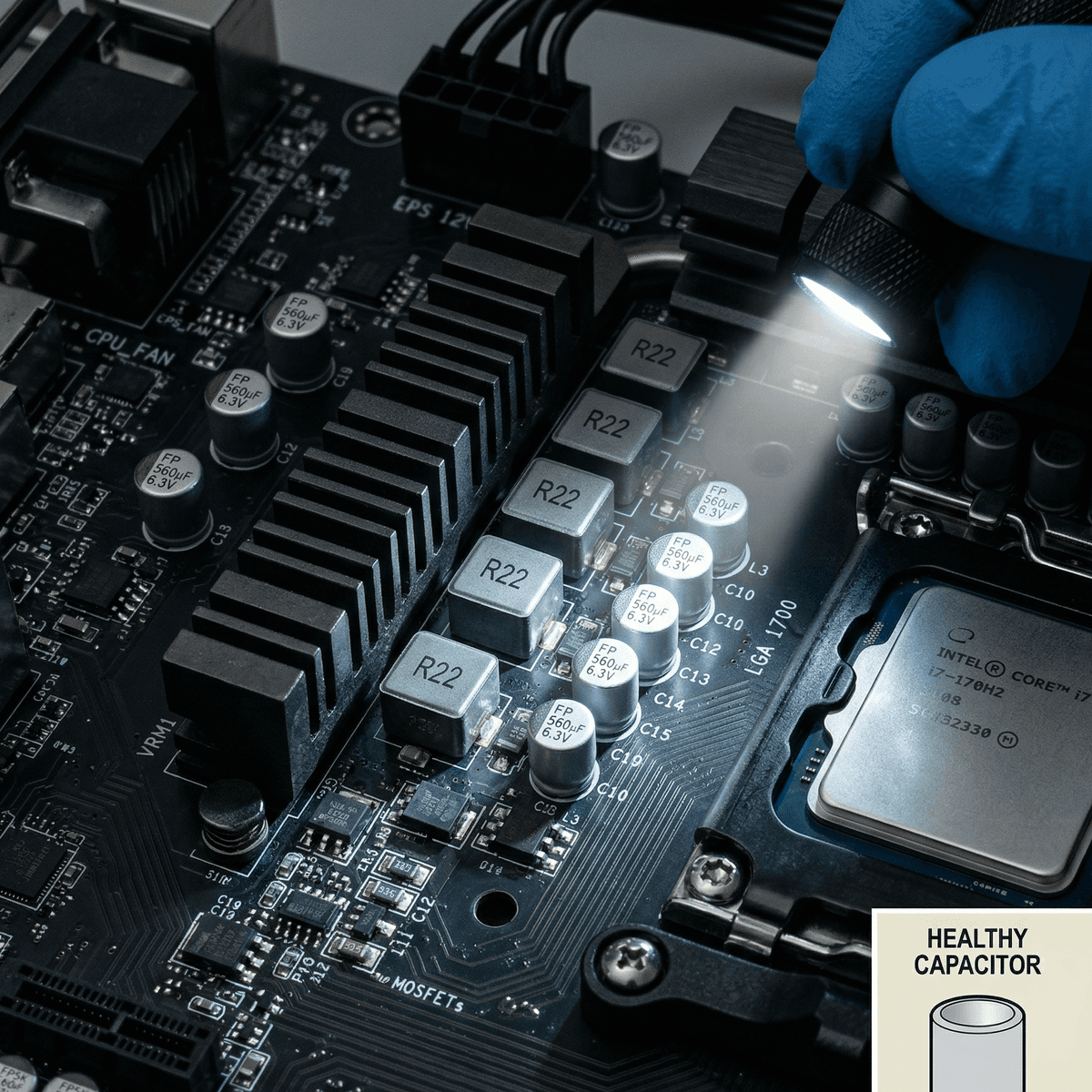
Solid, flat-topped capacitors are good. Domed tops indicate failure — walk away.
Copy/paste message template: Hi — could you share: (1) a BIOS POST photo or short video, (2) a torch-lit photo of the CPU socket, (3) a CPU-Z screenshot, (4) confirmation of whether it was overclocked, and (5) the last date it booted successfully? Also — any history of liquid cooling leaks near the board? Thanks.
Best used motherboards to buy in the UK (2026)
These boards strike the right balance of reliability, platform longevity, and second-hand value. Prices are typical UK sold prices — not asking prices.
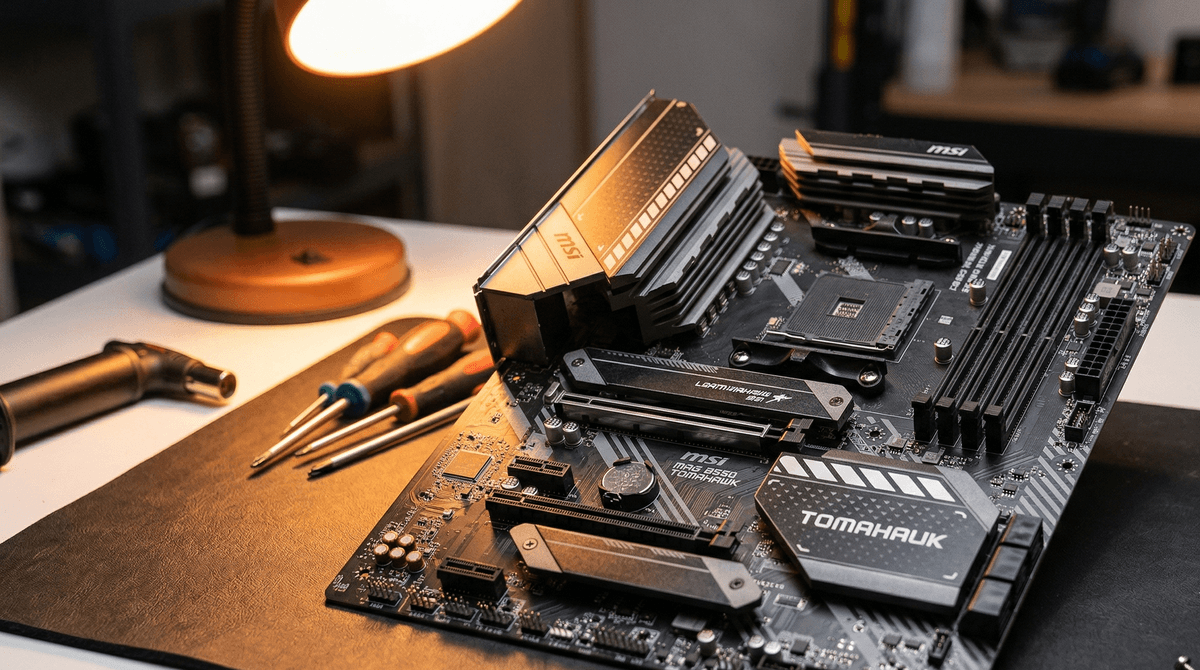
MSI B550 Tomahawk
Socket AM4 · ATX · DDR4
The B550 Tomahawk has a reputation as one of the strongest VRM implementations on any mid-range AM4 board. It handles Ryzen 5000 series CPUs including the 5800X3D without complaint, supports PCIe 4.0 on the primary slot, and has a sensible layout that survives years of use. One of the safest second-hand buys in the AM4 ecosystem. Look for the Max variant if you need PCIe 5.0 M.2 support.
ASUS ROG Strix B550-F Gaming WiFi
Socket AM4 · ATX · DDR4
A premium AM4 option with built-in WiFi 6, dual M.2 slots, and a very clean power delivery stage. ASUS's build quality here is excellent — the capacitors and chokes are well-rated for sustained loads. If you're planning a Ryzen 9 5950X or a 5800X3D in a used platform build, this is a confident match.
Gigabyte B450 Aorus Pro
Socket AM4 · ATX · DDR4
The budget workhorse of the AM4 generation. At around £40 second-hand it's an excellent entry point for a Ryzen 3600 or 5600 build. B450 boards have a BIOS update requirement to run Ryzen 5000, so always confirm the seller has already flashed to a compatible BIOS version — or that you have access to an older Ryzen CPU to do it yourself.
MSI MAG B660M Mortar DDR4
Socket LGA1700 · mATX · DDR4
One of the best compact LGA1700 options on the used market. The Mortar DDR4 is particularly appealing because DDR4 kits are far cheaper than DDR5 right now. Strong power delivery for a Micro ATX board, two M.2 slots, and solid cooling compatibility. Watch for the DDR4 vs DDR5 variant — they're not interchangeable.
ASUS Prime Z690-P DDR4
Socket LGA1700 · ATX · DDR4
LGA1700 supports 12th and 13th gen Intel Core processors — a platform with a long tail of used CPU availability ahead. The Z690-P is a conservative, well-built ATX board without the VRM compromises of some budget Z690 offerings. Three M.2 slots and PCIe 5.0 on the primary x16 slot make it modestly future-ready even as a second-hand buy.
For CPU guidance that pairs with these boards, see our best used CPUs to buy in 2026. Compatibility is everything — always cross-reference socket and chipset before purchasing.
On-arrival testing: what to check before you accept
The window between delivery and marking a purchase "received" is your protection. Run these checks before unwrapping the bubble wrap or throwing away the box.
Physical inspection (before installing)
- Under a torch: inspect the entire PCB surface for burn marks, corrosion patches, or discolouration — especially around the VRM heatsink area.
- Look at every capacitor near the CPU socket: all tops should be flat. Any dome-shaped or cracked caps should trigger a dispute immediately.
- Examine the CPU socket pins. Any bends, missing pins, or foreign material should be photographed and reported before installation.
- Flex the board gently: white stress fractures along the PCB are not normal and indicate rough handling or prior repair.
First boot checklist
- Board reaches BIOS with CPU, both RAM sticks, and storage detected correctly.
- XMP/EXPO profile applied — RAM runs at rated speed without crashing.
- All USB ports detected and functional (test with a USB drive or keyboard in each port).
- Both M.2 slots used: each SSD detected and readable.
- GPU in primary PCIe slot: full 16-lane bandwidth confirmed via GPU-Z.
- Run 15 minutes of Prime95 or Cinebench R23 multi-core — no throttling, no BSOD.
Dispute window
If a fault appears, photograph everything immediately with timestamps, do not continue using the board, and open a dispute within your platform's protection window. Provide the BIOS POST video from before purchase as evidence.
AM4 vs LGA1700: second-hand platform guide for UK buyers
AMD AM4
- Best value per pound in 2026 — enormous CPU availability (Ryzen 3000–5000)
- Ryzen 5 5600 and 5800X3D are outstanding second-hand performers
- DDR4-only — cheap, abundant RAM market
- B450 boards may need BIOS flash before running Ryzen 5000
- Platform is end-of-life — no future CPU upgrades beyond AM4
Intel LGA1700
- Supports 12th, 13th gen Intel — wide second-hand CPU count now entering market
- DDR4 variants exist — avoids expensive DDR5 kits
- PCIe 5.0 support on Z-series boards for future GPU/SSD use
- B660/H670 boards restrict overclocking — only Z690/Z790 for OC
- Prices haven't dropped as far as AM4 yet
Bottom line for 2026: If pure value is the goal, AM4 wins. If you want a slightly longer upgrade runway and can find a good LGA1700 deal, it's a solid alternative. Either way, confirm compatibility using our guide on how to check if PC parts are compatible.
FAQs: buying a used motherboard in the UK
Is a used motherboard worth the risk?
Yes — if you follow the pre-purchase checklist and run on-arrival tests promptly. The risk is real, but it's manageable. A board that POSTs on video, passes visual inspection, and runs its first stress test is overwhelmingly likely to continue working reliably. The danger comes from skipping verification steps entirely.
What's the biggest single risk when buying a used motherboard?
Bent or missing CPU socket pins on AM4 boards. They're invisible in distant photos, they can cause mysterious instability rather than clean failure, and they're expensive to repair. Always ask for a close-up photo under direct torch light.
Can I buy a used B450 board for a Ryzen 5600?
Yes, but only if the BIOS is already updated to support Ryzen 5000. Ask the seller explicitly — some B450 boards need an older Ryzen CPU to flash the update first. Confirm this before finalising the purchase, or factor in accessing an older CPU to complete the flash yourself.
How do I know if a motherboard has been used for heavy overclocking?
Ask directly and cross-reference against visual evidence. VRM heatsinks that look discoloured or boards with aftermarket VRM cooling additions are indicators. For CPU-Z screenshots, check if the CPU was listed at unusual clock or voltage settings. A clean voltage history in the CPU-Z screenshot is a reasonable sign of normal use.
What's the best cheap used motherboard in the UK right now?
For pure value in 2026, the Gigabyte B450 Aorus Pro at around £40 is hard to beat for AM4 Ryzen 3000 series. If you're running a Ryzen 5600 or 5800X3D, step up to the MSI B550 Tomahawk at around £60 for stronger VRM headroom. Browse current UK listings on Koukan for live pricing.
Ready to find a used motherboard in the UK?
The used motherboard market rewards the buyer who asks the right questions. Use this checklist, request proof, run arrival tests promptly, and you'll almost certainly land a reliable board at a fraction of new pricing. Skip the steps, and you're gambling with the most complex component in your build.
Before you finalise your board, make sure the rest of your build holds up — our guide on which PC parts are safe to buy used is the best place to start.
One last tip: collection vs courier
If geography permits, collect the board in person. You can watch a BIOS POST, see the socket under torch light, and check capacitors before any money changes hands. The risk profile of a motherboard purchase drops significantly when you can see it run live.
For courier deliveries, insist on proper ESD anti-static packaging (not just bubble wrap) and mark your dispute window in your calendar the moment the parcel lands. Run your arrival tests the same day — don't leave it open.
Advertisement