How to Sell a Used Motherboard in the UK
Advertisement
Selling a used motherboard is one of the trickiest moves in the second-hand PC parts market. Unlike a GPU or RAM stick — where "it works or it doesn't" is usually self-evident — a motherboard's value is tightly coupled to its socket generation, its chipset tier, and whether a full visual and functional inspection has been done. Get those three things right and you'll consistently sell faster and for a better price than the average listing.
This guide covers everything: which boards are actually moving in 2026, how to inspect and verify yours before listing, realistic UK price ranges, how to photograph and describe your board compellingly, how to package it so it arrives intact, and where to sell it. We'll also answer the specific questions sellers always ask — bent pins, missing I/O shields, BIOS versions, and whether to include accessories.
If you're also selling other parts from the same system, our complete guide to selling used PC parts in the UK is a good companion read. Selling a CPU at the same time? See how to sell a used CPU in the UK.
Which Motherboards Actually Sell in 2026
The used motherboard market is socket-driven. A board from 2020 on a socket with an active upgrade path still commands solid money; a board on a dead socket struggles to find a buyer at any price. Here's where the UK market stands in mid-2026.
AM4 — Still Very Active
AMD's AM4 socket (Ryzen 3000/5000 series) remains the most liquid socket in the UK used market. Millions of systems were built on B450, X470, B550, and X570 boards, and a large secondary buyer pool exists — people upgrading from Ryzen 3000 to a used 5000-series CPU, or builders wanting a capable platform on a strict budget. B550 ATX boards (MSI MAG B550 Tomahawk, ASUS ROG Strix B550-F, Gigabyte B550 AORUS Elite) are the sweet spot: strong demand, honest prices, no difficulty finding buyers.
Older B450 boards still sell but at lower margins. X570 boards (premium features, active chipset fan) attract enthusiasts and can command a small premium over equivalent B550.
AM5 — Growing Strongly
Ryzen 7000-series AM5 boards (B650, B650E, X670, X670E) are entering the used market in meaningful volume for the first time. B650 ATX and mATX boards are the fastest-moving segment as buyers look to step onto the AM5 platform affordably. Prices are still high relative to older sockets but are falling steadily — good news for sellers listing now before the curve steepens further.
LGA1700 — Stable and Respected
Intel's LGA1700 socket (12th and 13th Gen — Alder Lake and Raptor Lake) is the used Intel sweet spot in 2026. B660, Z690, B760, and Z790 boards are all trading on the secondary market. Z790 high-end boards attract serious buyers; B660/B760 mATX boards find homes quickly in budget builds. LGA1700 buyers often want boards with DDR5 support, so check your board's memory type (DDR4 vs DDR5) and flag it clearly in the listing.
B-Series vs X-Series
B-series boards (B550, B650, B760) have broader market appeal because more budget builders are looking for them. X-series and Z-series boards (X570, Z690, Z790) attract a smaller, more knowledgeable buyer who wants overclocking headroom, better VRMs, and more PCIe lanes. Both sell — but X/Z buyers ask harder questions, so your inspection and proof of function need to be airtight.
Quick socket reference
- AM4 (B550/X570): High demand, fast sales, very liquid
- AM5 (B650/X670): Growing, prices still elevated
- LGA1700 (B760/Z790): Stable demand, DDR4 vs DDR5 matters
- AM4 (B450/X470): Sells but at budget prices
- LGA1200, LGA1151: Slow-moving; price accordingly
The Visual Inspection Checklist
Before you even consider pricing your board, carry out a thorough visual inspection under good light. Buyers on Koukan and eBay are experienced — they will spot damage you missed. Better to find it yourself, disclose it honestly, and price accordingly.

CPU socket pin condition is the single most important visual check. Photograph it under a torch before listing.
CPU Socket
On AMD AM4 and AM5 boards the pins live in the socket, not the CPU. Use a torch and magnifying glass to examine every row. A single bent pin can mean missing CPU lanes, random crashes, or a no-boot scenario. Note any bent pins honestly in your listing. On Intel LGA1700, the socket uses pads rather than pins — look for corrosion, debris, or damage to the socket housing instead.
RAM Slots
Check that all RAM clips open and close smoothly. Look inside the slot channel with a torch — bent contacts, debris, or corrosion inside the slot can cause intermittent RAM faults. Note in your listing how many sticks you tested and whether dual-channel was confirmed working.
PCIe Slots
Examine the primary x16 slot and any secondary x4 or x1 slots. The clip mechanism on the main x16 slot should hold a GPU securely. Look for cracked slot housing, bent contacts, or burn marks — the latter can indicate an overloaded power delivery event.
VRM Capacitors and MOSFETs
Run your eye along the VRM area (usually top-left and top of the board near the CPU socket). Capacitors should be perfectly upright — any that are bulging, leaning, or have dark residue at the base are a serious red flag. Burnt or discoloured MOSFET heatsinks are equally concerning.
SATA Ports, USB Headers, and M.2 Slots
SATA port clips should click and hold a cable. Look for any ports with cracked plastic or missing pins. USB 2.0 and 3.0 internal headers should have all pins present and undamaged. M.2 slots: check the retention screw hole isn't stripped, and that there's no debris in the slot.
I/O Backplate
Including the I/O shield (backplate) meaningfully improves resale value and buyer confidence — it signals the board was stored properly and not repeatedly handled carelessly. If you have the original box accessories bag, include the cable ties, SATA cables, and Wi-Fi antenna if they came with the board.
What kills resale value
- • Bent CPU socket pins (even one pin can reduce value by 30–50%)
- • Bulging VRM capacitors or burn marks anywhere on the PCB
- • Liquid residue or corrosion from coolant leaks
- • Missing M.2 heatsink or stripped screw holes
- • No evidence of POST test — untested boards are hard sells
BIOS / UEFI Testing Before You Sell
A board that you can prove reaches the BIOS screen with a CPU and RAM installed is worth significantly more than one sold as "untested." Even a basic POST confirmation lifts buyer confidence and reduces disputes.
Minimum Viable Test Setup
You don't need a complete system. You need: the motherboard, a compatible CPU, one stick of RAM, a PSU, and a monitor (or integrated graphics output). Connect them outside a case — on top of the motherboard box works fine — and power on. If you reach the BIOS/UEFI screen and the CPU, RAM, and any connected storage are detected, that's your proof. Record a 10-second video and attach it to your listing.
Clear CMOS Before Sale
Always clear the CMOS before selling. This resets any overclocking profiles, custom boot order, and saved passwords — leaving a clean slate for the buyer. Use the Clear CMOS jumper (usually labelled JBAT1 or CLR_CMOS near the battery), or simply remove the CMOS battery for 30 seconds with the PSU unplugged. Re-seat the battery and confirm the BIOS resets to defaults on next boot.
What to Check in BIOS
- CPU detected correctly (model name and core count visible)
- RAM detected in all slots you want to advertise as working
- XMP/EXPO profile available (even if you don't enable it)
- All M.2 slots show available in BIOS storage options
- BIOS version number — note this in your listing
- No error codes or POST beeps during boot
Tip: Screenshot your BIOS
Many UEFI systems support a screenshot function (usually F12 in the BIOS). Use it to capture the CPU/memory detection screen and attach the image alongside your listing photos. It takes 30 seconds and dramatically boosts buyer confidence — especially for higher-value X-series or Z-series boards.
Pricing Your Used Motherboard in the UK
Motherboard pricing is more nuanced than CPUs or GPUs because the socket, chipset tier, form factor, and included accessories all feed into the final number. Here's how to arrive at a fair, competitive price.
Where to Look Up Prices
The most reliable data comes from actual completed sales, not asking prices. Check:
- Koukan sold listings — filtered to UK buyers, reflecting what UK sellers are actually achieving right now
- eBay completed/sold listings — filter by "Sold Items" in the left-hand sidebar; ignore unsold asking prices
- Facebook Marketplace sold — useful for local price calibration, though volume is lower for motherboards than GPUs
Always search by the exact model name (e.g. "ASUS ROG STRIX B550-F ATX") rather than just the chipset. Prices vary by £15–40 between models on the same chipset.
2026 UK Price Ranges by Socket and Tier
Approximate ranges for boards in good working condition with I/O shield. Prices without shield or accessories typically sit 10–15% lower.
| Board / Chipset | Socket | Typical Used Price | Notes |
|---|---|---|---|
| B550 ATX (mid-tier) | AM4 | £55 – £90 | Most liquid segment |
| X570 ATX | AM4 | £80 – £140 | Enthusiast interest |
| B450 ATX | AM4 | £30 – £55 | Budget segment |
| B650 ATX | AM5 | £100 – £160 | Fast-growing demand |
| X670E ATX | AM5 | £180 – £280 | Enthusiast / HEDT |
| B760 ATX / mATX | LGA1700 | £60 – £100 | Solid mid-market demand |
| Z790 ATX | LGA1700 | £130 – £240 | High-end, knowledgeable buyers |
| B660 / H670 ATX | LGA1700 | £45 – £80 | Budget Intel builds |
Pricing adjustments
- +10–20% — Original box and full accessory pack included
- +5–10% — BIOS POST video proof provided
- –10–15% — No I/O shield or accessories
- –20–40% — Single bent CPU socket pin (disclose honestly)
- –30–50% — Known fault, listed as "for parts"
Writing a Winning Motherboard Listing
The title of your listing does more work than any other element. Buyers search by model name, socket, and chipset — if your title doesn't contain those terms, your listing won't surface in relevant searches.
Title Formula
[Brand] [Full Model Name] [Socket] [Form Factor] [Chipset] — [Condition] — [Key Accessory if included]
Example: ASUS ROG STRIX B550-F GAMING AM4 ATX B550 — Excellent Condition — I/O Shield + Full Box
Example: MSI MAG B650 TOMAHAWK WIFI AM5 ATX B650 — Good Condition — POST Tested
Description Checklist
Your description should answer every question a careful buyer would ask:
- Full model name (copy it from the BIOS boot screen if needed)
- Socket and compatible CPU generations (e.g. "Supports Ryzen 5000 natively; 3000 with BIOS update")
- Form factor (ATX, mATX, ITX) and memory type (DDR4 or DDR5)
- Max RAM speed supported and number of slots
- Number of M.2 slots and which interface (NVMe / SATA)
- BIOS version currently installed
- POST test result — what you tested with, what was detected
- Visual condition notes — honest description of any marks, scratches, or known issues
- What's included (I/O shield, SATA cables, Wi-Fi antenna, original box, accessories)
- Whether CMOS has been cleared
Photography Guide for Motherboards
Motherboards are complex, multi-layered items. A single blurry hero shot won't cut it. Buyers need to see specific areas clearly — and if they can't, they'll skip your listing for one where they can.
Shot List (minimum 8 photos)
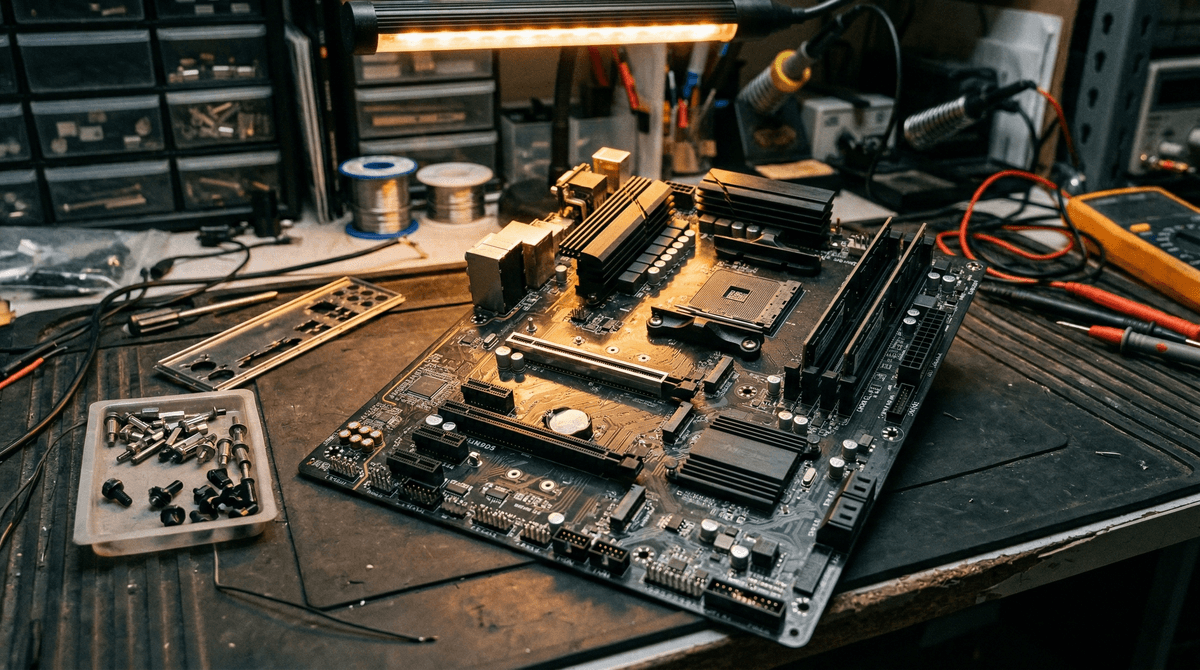
- Hero shot — top-down, full board: Place the motherboard flat on a dark, non-reflective surface (black foam or dark cloth works well). Shoot directly overhead, board filling the frame. This is your thumbnail shot.
- CPU socket close-up under torch: This is the most important single photo. Angle a torch across the socket and shoot macro. Buyers will zoom in to check every pin.
- RAM slots — close-up of both slot pairs
- Primary PCIe x16 slot — angled shot showing the clip and contact area
- VRM area — top-left of board near CPU socket, showing capacitors and heatsinks
- I/O area — rear I/O ports, ideally with the I/O shield in place if included
- SATA ports and USB internal headers
- BIOS POST screenshot or photo of screen — showing CPU, RAM, and storage detected
Lighting and Background
Natural window light or a soft LED panel works best. Avoid direct flash — it washes out PCB detail and creates glare on heatsinks. A dark background (black anti-static mat, dark cardboard, or dark cloth) makes the board colours pop and looks professional. Shoot in landscape orientation for most shots; portrait or square for socket and slot close-ups.
How to Package a Motherboard for Safe Shipping
A motherboard is a large, rigid PCB with protruding heatsinks, capacitors, and port clusters. It's fragile under lateral flex and vulnerable to electrostatic discharge (ESD). A poor packing job is one of the most common sources of buyer disputes — and insurance claims are rejected if the packing is deemed inadequate.
The Original Box — Use It If You Have It
Retail motherboard boxes are engineered to hold the board safely, often with custom foam inserts and an anti-static bag already included. If you kept the original packaging, use it. It signals care, looks professional, and gives couriers the optimal outer protection. Slip the boxed product inside a second outer box with void fill if needed.
Without the Original Box — Cardboard Sandwich Method
If you don't have the original box, do the following:
- Place the motherboard in a large anti-static bag (pink or silver). Seal it.
- Cut two pieces of thick corrugated cardboard slightly larger than the board. Place one below and one above, forming a rigid "sandwich."
- Wrap this sandwich in 2–3 layers of large-bubble bubble wrap. Secure with tape.
- Place in a double-wall cardboard box with at least 5 cm of void fill (crumpled paper or foam peanuts) on all six sides.
- Seal the outer box thoroughly and mark it "FRAGILE — ELECTRONICS — THIS WAY UP".
ESD Warning
Never ship a motherboard in an ordinary plastic bag or in a box filled only with newspaper. Static discharge can invisibly damage sensitive components during transit. Always use a proper anti-static bag. They cost pennies and prevent costly disputes.
Couriers and Insurance
For UK domestic shipping, Royal Mail Tracked 48/24 covers parcels up to 2 kg and includes £100 of compensation — usually sufficient for budget boards. For mid-range or high-end boards (£100+), use Evri Standard (with declared value insurance), DPD, or Parcelforce 48. Always declare the actual value and purchase additional cover if available. Keep proof of postage and photographs of the packed parcel. For detailed courier advice, see our guide on how to ship PC parts safely in the UK.
Where to Sell Your Used Motherboard
You have several options in the UK. Each has a different buyer profile, fee structure, and effort level. Here's an honest comparison.
| Platform | Fees | Buyer Quality | Best For |
|---|---|---|---|
| Koukan | 0% seller commission | PC builders — know what they're buying | All sockets; fast, targeted audience |
| eBay | 0% private / ~12.3% business | Mixed — wider reach, 30-day forced returns | High-volume clearance; parts-swap risk |
| Facebook Marketplace | Free (local) / small fee (shipping) | Variable — local buyers can low-ball | Local collection; avoid postage risk |
| Reddit / Hardware forums | Free | Excellent — experienced buyers | Niche / enthusiast boards; X/Z series |
For most sellers, listing on Koukan first makes the most sense. The audience is exclusively UK-based PC builders who understand component specs — they're not going to ask you what a VRM is. You'll also find buyers who are specifically searching by socket or chipset, which means your listing reaches the right people without you having to shout louder than the noise on a general marketplace.
Frequently Asked Questions
Does a missing I/O shield affect resale price?
Yes, noticeably. A missing I/O shield typically reduces the sale price by 10–15% because it signals the board was used without its full accessory pack, raises questions about how it was stored, and inconveniences the buyer (who may need to track down a compatible replacement). If you can't find yours, note the absence clearly in the listing and reflect it in the price.
Should I include the CPU cooler mounting bracket?
Always include any mounting hardware that came with the board — AM4 and AM5 cooler brackets, standoffs, and screws if present. Some buyers are replacing only the board and will need to fit an existing cooler; missing brackets force them to source extras. If you're selling a matching CPU separately, note in both listings that the bracket is included with the motherboard, not the CPU.
Can I sell a motherboard with a bent CPU socket pin?
Yes — but full disclosure is essential. A single slightly bent pin can sometimes be straightened carefully with a mechanical pencil or fine implement, and the board may work perfectly. Multiple bent or broken pins are a harder sell. List the board honestly as "bent pin — sold as seen / for parts or repair" and price it at 40–60% of the working equivalent. Hiding a bent pin and selling as working is grounds for a return or PayPal/Koukan dispute and should never be done.
Does the BIOS version matter to buyers?
For AM4, definitely. Many B450/X470 boards require a BIOS update to support Ryzen 5000-series CPUs, and if your board is already on a 5000-compatible BIOS, that's a genuine selling point — state it explicitly in the title or description. For AM5 and LGA1700 boards, BIOS version matters less for CPU compatibility (those platforms are mature) but buyers may still appreciate knowing it's on a recent version. Always note the version in your listing.
Is it worth selling a budget B450 or H310 board in 2026?
B450 boards are still worth listing — there's a real buyer pool looking to upgrade their CPU on an existing AM4 platform. Expect £28–50 for common models in good condition. H310 and H310M boards (LGA1151, 8th/9th Gen Intel) are harder. They sell occasionally to buyers with a compatible CPU who need a replacement board, but if you're spending significant time on photography and postage for a £15–20 return, weigh whether it's worth it versus local collection only.
Do I need to sell the board with the RGB software or drivers?
No. Drivers and software are freely downloadable from the manufacturer's website and are always the latest version there anyway. You don't need to include a driver disc (and most buyers no longer have an optical drive). Simply note the manufacturer in your listing (ASUS Armoury Crate, MSI Dragon Center / MSI Center, Gigabyte RGB Fusion, etc.) so the buyer knows which software ecosystem they're entering.
Ready to sell your motherboard?
Koukan connects UK sellers directly with PC builders who know exactly what they need. No general marketplace noise — just verified buyers searching for your socket. List in minutes, sell to people who get it.
List Your Motherboard on KoukanAlso worth reading: Buying a used motherboard in the UK · How to ship PC parts safely
Advertisement