How to Buy a Used SSD in the UK: What to Check & Where to Find Deals
Advertisement
Of all the used PC parts you can buy in the UK, a second-hand SSD is among the safest — IF you run a health check before committing. Unlike CPUs or RAM, SSDs have a measurable lifespan, and the tools to read it are free and take under two minutes to use.
This guide covers everything: the different SSD types, how to interpret health data, what TBW numbers mean in practice, 2026 UK price benchmarks, and how to spot a bad listing before you lose money. For the broader picture of buying used parts safely, see our pillar guide: how to buy used PC parts in the UK. Not sure whether SSDs are safe to buy used at all? We cover that directly in which PC parts are safe to buy used.
Types of used SSDs explained
Before you buy, confirm you're getting the right interface for your system. Plugging the wrong type into your motherboard ranges from "it won't fit" to "it fits but runs at half speed."
SATA 2.5" (the classic)
The rectangular drive that looks like a miniature laptop hard drive. It uses a SATA III connection capped at ~550 MB/s sequential read. Works in virtually every PC and most laptops. Great for secondary storage but slower than modern NVMe.
M.2 SATA
The slim M.2 form factor (usually 2280 — 22 mm wide, 80 mm long) but running the older SATA protocol. Same speed as 2.5" SATA, just a different physical connector. The catch: it uses an M.2 slot, but not the PCIe lane — so if your board has only one M.2 slot, you may want to reserve it for a faster NVMe drive.
M.2 NVMe PCIe Gen 3 (sweet spot for value)
Runs over PCIe 3.0 lanes — sequential reads of ~3,500 MB/s. Drives like the Samsung 970 EVO Plus and WD Blue SN570 sit here. Most mainstream motherboards from 2018 onwards support these, and they represent the best used-market value point in 2026.
M.2 NVMe PCIe Gen 4 (higher-end)
Runs over PCIe 4.0 — sequential reads up to ~7,000 MB/s. Examples include the Samsung 980 Pro and WD Black SN850X. Requires a Gen 4 compatible slot (AMD Ryzen 5000+ or Intel 12th Gen+). Used prices are coming down but still carry a premium.
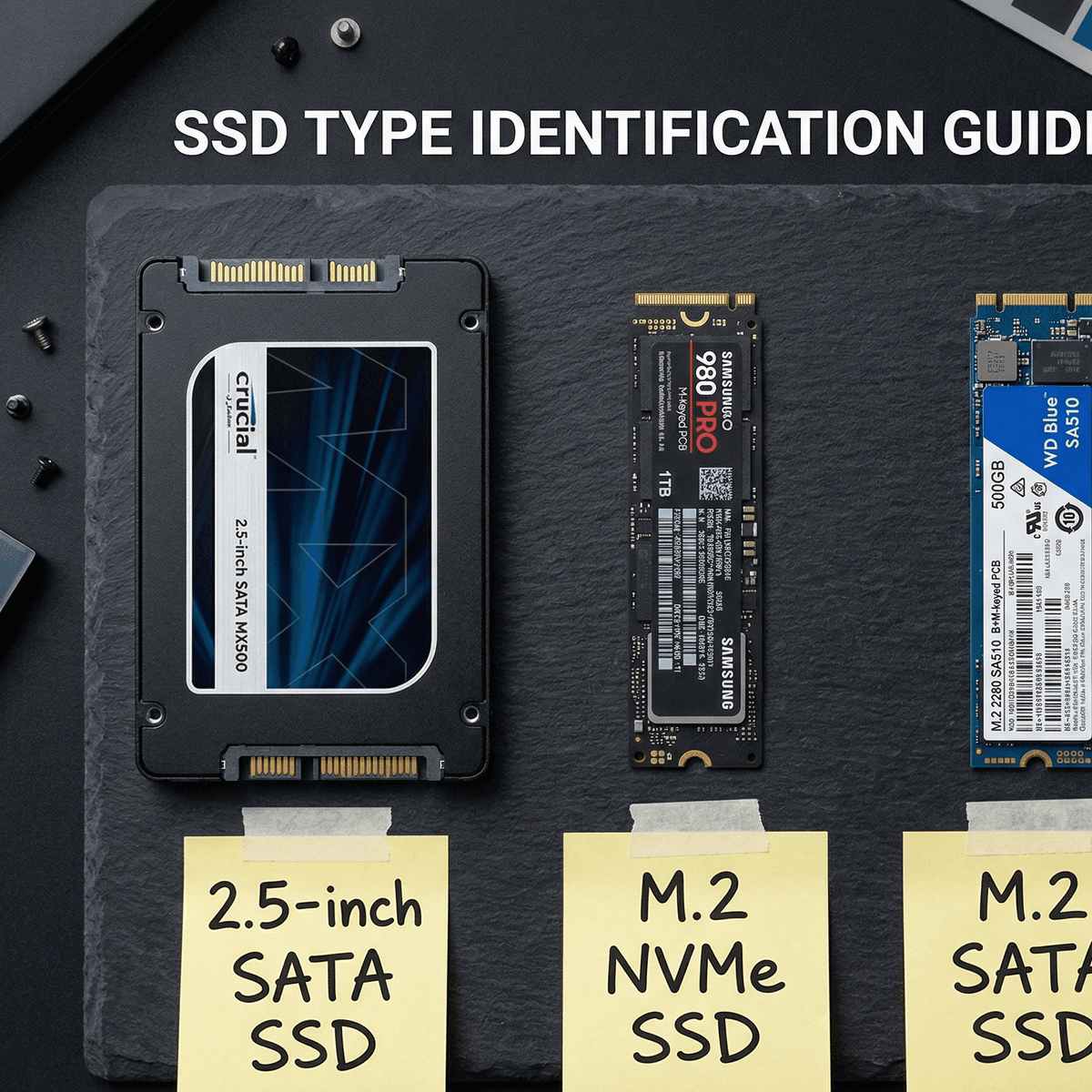
Left to right: 2.5" SATA, M.2 NVMe, M.2 SATA — different interfaces, different speed ceilings.
Interface compatibility quick-check
- →M-key M.2 slot = accepts NVMe and M.2 SATA (check your board's spec sheet)
- →B+M-key M.2 slot = typically SATA only, won't run NVMe at full speed
- →PCIe 3.0 slot won't bottleneck a Gen 3 NVMe; it will cap a Gen 4 drive at Gen 3 speeds
The health check: CrystalDiskInfo
CrystalDiskInfo is the standard free tool for reading a drive's SMART data — the self-monitoring log every modern SSD keeps internally. It takes under two minutes and tells you almost everything you need to know about a drive's remaining life.
What to ask the seller
Before you pay, ask the seller to share a CrystalDiskInfo screenshot. A genuine seller won't hesitate. Here's what to look for in the screenshot:
- Health status: should show Good in green. Caution or Bad is a hard no.
- Health percentage: the number next to the status indicator. Aim for 90%+ for a confident buy; 85–90% is still usable but warrants a lower price. Below 85%? Skip it.
- Total Host Writes / Total Bytes Written: how much data has been written to the drive lifetime. Compare against the TBW rating (see table below).
- Power On Hours: gives you a sense of usage duration. Over 30,000 hours on a consumer drive is heavy use.
- Reallocated Sectors Count: should be 0. Any non-zero value means the drive has already had to retire bad sectors.
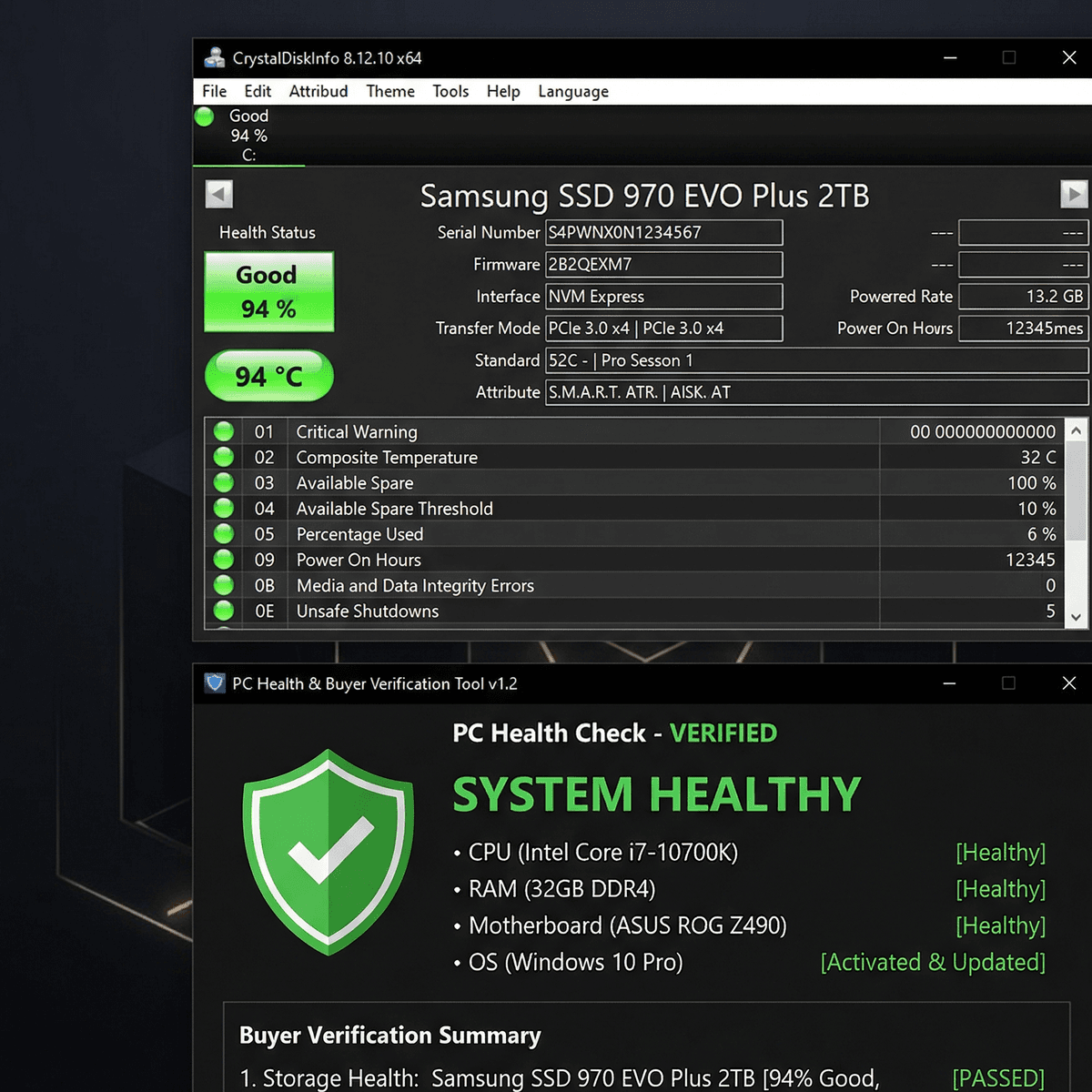
Green “Good” status at 94% — this drive has plenty of life left.
Copy/paste message for sellers: Hi — could you share a CrystalDiskInfo screenshot of this SSD? I’d like to see the health percentage, total bytes written, and power-on hours before I commit. Thanks.
TBW reference — how much life is left?
TBW (Total Bytes Written) is the manufacturer's rated write endurance for a drive. When a seller shares CrystalDiskInfo, you can compare the "Total Host Writes" figure against the drive's rated TBW to estimate remaining life.
Example: a Samsung 870 EVO 1TB has a rated TBW of 600 TB. If CrystalDiskInfo shows 120 TB written, the drive has used 20% of its rated endurance — excellent condition for a used buy.
| Drive | Type | Capacity | Rated TBW | Skip if written › |
|---|---|---|---|---|
| Samsung 870 EVO | SATA 2.5" | 1 TB | 600 TB | ~510 TB |
| WD Blue (SATA) | SATA 2.5" | 1 TB | 600 TB | ~510 TB |
| Samsung 970 EVO Plus | NVMe Gen 3 | 1 TB | 600 TB | ~510 TB |
| Crucial MX500 | SATA 2.5" | 1 TB | 360 TB | ~306 TB |
“Skip if written ›” = 85% of rated TBW consumed. These are conservative thresholds for used buyers.
UK used SSD price guide (2026)
These are realistic mid-market sold prices for good-condition drives (85%+ health, under half TBW consumed). Listings below these figures warrant extra scrutiny. Anything more than 15% above is probably overpriced for the used market.
Best used SATA buy. Plentiful stock.
Lower TBW rating — check writes carefully.
Excellent value NVMe. Very common.
Premium brand, higher resale. Worth it.
Prices are UK used-market estimates for 2026. New retail prices have compressed significantly — if a used price is within £5 of new, just buy new.
Red flags in used SSD listings
The SSD market doesn't have the same scam density as GPUs, but there are patterns that reliably signal a drive you'll regret buying.
- Health not disclosed. Any seller who won't share a CrystalDiskInfo screenshot when asked is concealing something. This is the single biggest warning sign.
- ‘Works fine but...’ disclaimers. "Works fine but it's been running 24/7 for 3 years" or "works fine but occasionally throws errors" — the "but" always costs you money.
- Used in a mining rig. NVMe drives used as swap space in crypto mining rigs accumulate enormous write loads quickly. If a listing mentions mining, always insist on TBW data.
- Stock photos only. A seller who can't show their own drive in their own hands is a hard no.
- Vague capacity. "1TB SSD, NVMe, fast" — no model name, no proof. Walk away until they give you a specific model number.
- Bank transfer only. Pay via PayPal Goods & Services or a platform with built-in buyer protection.
What to test when the SSD arrives
Do these checks before you install your OS or copy any data. You have a short window to return a drive if it fails — keep the packaging.
Step 1 — CrystalDiskInfo health check
Download CrystalDiskInfo (free, portable) and run it as soon as the drive is connected. Verify health status is Good and that the SMART values match what the seller showed you. If there's a discrepancy, that's grounds for a return.
Step 2 — CrystalDiskMark speed test
Run CrystalDiskMark (same developer, also free) on the drive. Check sequential read and write speeds against what's normal for the drive's interface:
- SATA SSD: ~500–560 MB/s sequential read is healthy.
- NVMe Gen 3: ~3,000–3,500 MB/s sequential read is healthy.
- NVMe Gen 4: ~5,000–7,000 MB/s sequential read is healthy.
A drive clocking 40% below its rated sequential speed is showing signs of degradation or a thermal throttling problem.
Step 3 — 24-hour surface scan (optional but worth it)
For SATA drives: run a full surface scan in CrystalDiskInfo or a tool like HDDScan overnight. Any bad blocks found during a surface scan on a drive under 50% TBW usage should trigger an immediate return. NVMe drives don't support traditional surface scans, but the SMART data and speed test together give an equivalent picture.
Pro tip: before you write a single byte of your own data, run the speed test and health check. Once you’ve installed your OS, returning a drive becomes complicated. Test first, commit second.
Where to buy used SSDs in the UK
The UK used SSD market is well-stocked in 2026, but not all platforms are equal for a buyer doing their due diligence.
Koukan
A UK marketplace built specifically for PC components. Listings are structured to include the key information buyers need — exact model, condition grade, and photos. The part-exchange model means sellers are often enthusiasts clearing out an upgrade path, not unknown resellers.
eBay
The largest volume of listings in the UK, but variable quality. Filter by sold prices (not asking prices) to benchmark what "good value" actually looks like. Always pay via PayPal Goods & Services for buyer protection, and always request CrystalDiskInfo data before paying. Avoid auction listings where you can't ask questions first.
CEX
CEX tests drives before resale and offers a 24-month warranty on used hardware. Prices are typically 10–15% higher than private sales, but the warranty and in-store testing reduce your risk significantly. A good option if you're not comfortable running your own health checks.
Facebook Marketplace
Local, cash-in-hand deals can offer good prices — but no buyer protection without Marketplace checkout. Best used for collection-only deals where you can inspect the drive (and run a quick CrystalDiskInfo check on the seller's machine) before handing over money.
Frequently asked questions
Is a used SSD safe to use?
Yes — with a health check. SSDs have measurable endurance, and a drive at 90%+ health with well under half its rated TBW consumed is statistically likely to outlast your next build. The risk with buying used is getting a drive that's near end-of-life without knowing it — CrystalDiskInfo removes that uncertainty in two minutes.
How long do SSDs last?
Most consumer SSDs are rated for 300–600 TB of writes over their lifetime. In typical desktop use — OS, gaming, light content work — an average user writes roughly 30–60 GB per day, meaning a 600 TB drive would take 25–55 years to wear out from writing alone. In practice, firmware issues or physical damage are more likely failure modes than endurance exhaustion. A used drive at 85%+ health still has years of reliable use ahead.
What health percentage is too low for a used SSD?
Our threshold is 85%. Below that, the drive may still function for years — but the risk-to-reward ratio for a used purchase tilts against you, especially at typical UK asking prices. If a seller will only accept a price reflecting the reduced health, factor in that you may need to replace it sooner than expected.
Can I use an M.2 NVMe SSD in any M.2 slot?
Not always. Some M.2 slots are SATA-only and physically accept the M.2 connector but won't run NVMe. Others support both. Check your motherboard's manual or specification page before buying — look for whether the slot is described as "PCIe / NVMe" or "SATA only."
Is it worth buying a used SSD over a new one in 2026?
For NVMe Gen 3 drives, yes — new 1TB NVMe SSDs can be found for ~£50–60, so a used drive at £35–45 with 90%+ health makes sense. For SATA 2.5" drives, the gap between new and used is narrower; if a new 1TB SATA SSD is £45 and a used one is £38, the used saving is marginal. In that case, factor in warranty value and buy whichever gives better peace of mind for your budget.
Final thoughts: two minutes of checking saves real money
Used SSDs are one of the most reliable second-hand components in the UK market — but only if you check health before buying and test on arrival. A two-minute CrystalDiskInfo screenshot request filters out bad drives, overconfident sellers, and misleading listings before you spend a penny.
Stick to drives at 85%+ health, verify TBW against the manufacturer rating, run a speed test when it arrives, and you'll get excellent-value storage for your build. For more on safe used part buying, see our guide on is it safe to buy used PC parts in the UK.
Advertisement