Buy a Used Gaming Monitor in the UK: Resolution, Refresh Rate & Safety
Advertisement
A used gaming monitor is one of the smartest purchases you can make in the second-hand PC market. Unlike a CPU or GPU, a monitor's performance doesn't degrade with use — a well-maintained 1440p 165Hz IPS panel from 2021 games just as well today as the day it left the factory. In 2026, UK buyers can save £80–£250 off new retail prices simply by buying used, often landing flagship-tier screens at mid-range prices.
That said, monitors do carry unique risks in the used market: dead pixels, screen burn-in (especially on OLED panels), backlight bleed, and port damage can all turn a bargain into a headache. This guide walks you through every step — from understanding panel technology to inspecting in person — so you buy with confidence.
2026 UK Used Monitor Savings at a Glance
- 1080p 144Hz IPS: New ~£130 → Used £55–£85 (save ~40%)
- 1440p 165Hz IPS: New ~£280 → Used £120–£180 (save ~40%)
- 4K 144Hz IPS: New ~£550 → Used £240–£340 (save ~40%)
- 27" OLED 240Hz: New ~£800 → Used £380–£480 (save ~45%)
Is It Safe to Buy a Used Monitor?
Used monitors are generally safe to buy, but they carry specific risks you won't encounter with most other PC components. Understanding these risks means you can screen them out before purchasing — or negotiate a lower price if minor issues are present.
Dead Pixels
A dead pixel is a pixel that remains permanently black or stuck at a solid colour (red, green, or blue). IPS and TN panels occasionally develop these over time. A single dead pixel near the edge of a 27" screen is barely noticeable; a cluster of three in the centre is unusable. The ISO 13406-2 standard formally defines quality tiers, but most UK private sellers will not offer a warranty. Always ask the seller to confirm zero dead pixels — and test yourself on collection.
Screen Burn-In (OLED Risk)
Screen burn-in is the permanent retention of a static image baked into the panel. It is almost exclusively an OLED problem — IPS, VA, and TN LCD panels are essentially immune to true burn-in (though they can exhibit temporary image retention that fades). If you're buying a used OLED gaming monitor, burn-in is the single biggest risk. Ask for a solid grey test image photo and look for ghost outlines of taskbars or HUD elements.
Backlight Bleed & IPS Glow
IPS panels commonly show a slight glow in the corners of a black screen in a dark room — this is a manufacturing characteristic, not failure. Heavier backlight bleed (large bright patches) is a defect. VA panels are the most uniform but can exhibit "dirty screen effect" — a patchy, mottled look on uniform gradients that worsens over time.
What sellers must disclose: UK consumer law requires private sellers to describe goods accurately. If a seller knowingly hides dead pixels or burn-in, you may have recourse under the Misrepresentation Act 1967. Always get condition claims in writing (message thread) before paying.
How to Test Before Paying
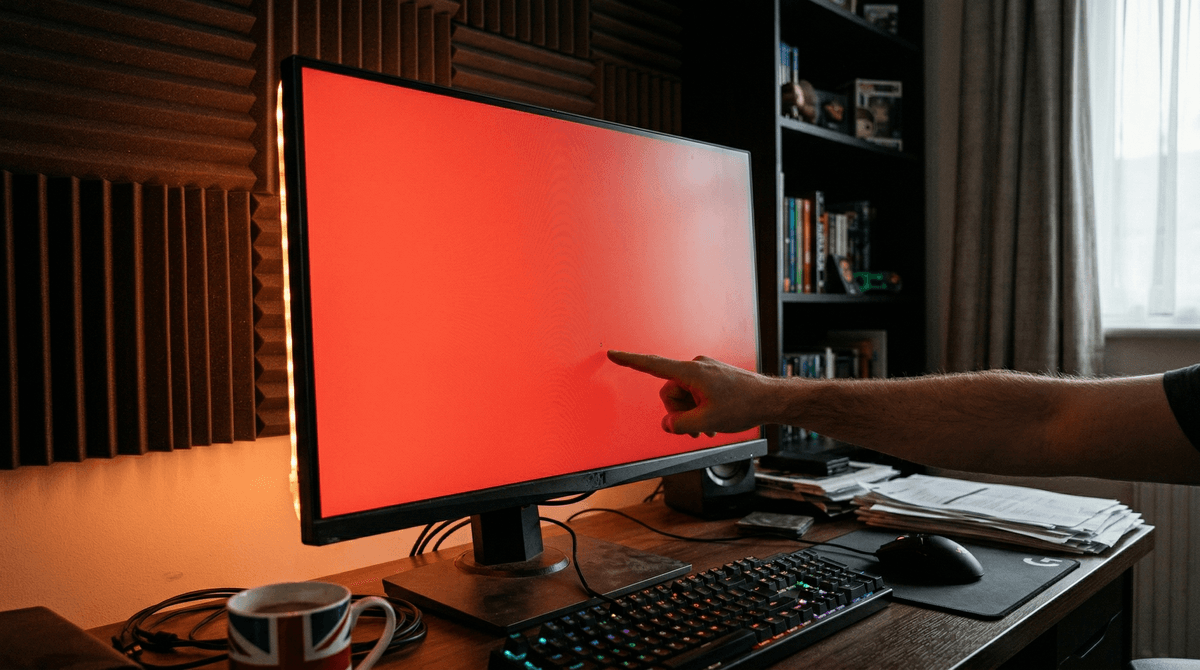
The best tool is a free browser-based pixel tester. Sites like deadpixeltest.org or monteon.ru cycle the screen through full-screen red, green, blue, white, and black, making any stuck or dead pixels immediately obvious. Ask the seller to open one of these on their machine before you hand over cash.
Panel Types: IPS vs VA vs TN vs OLED
Your choice of panel technology is arguably the most important decision when buying a used gaming monitor. Each type has different strengths, weaknesses, and used-market risk profiles.
| Panel Type | Colour Accuracy | Response Time | Contrast | Used Risk |
|---|---|---|---|---|
| IPS | Excellent | Good (1–4ms) | Moderate (1000:1) | Low |
| VA | Good | Moderate (4–8ms) | High (3000:1+) | Medium |
| TN | Poor | Very Fast (1ms) | Low (600:1) | Low |
| OLED | Outstanding | Instant (0.03ms) | Infinite | High (burn-in) |
Which Panel Is Safest Used?
IPS is the safest panel to buy used. It has excellent colour fidelity, solid gaming performance, and essentially no long-term failure mode outside of physical damage or backlight degradation (which takes thousands of hours). TN is also low risk but delivers poor colour and viewing angles — acceptable only for pure competitive play. VA panels carry medium risk due to the gradual worsening of the dirty screen effect and slow pixel response. OLED is the highest risk and requires thorough burn-in testing; buy from a seller who can demonstrate the panel clearly on a grey screen before money changes hands.
Resolution: 1080p vs 1440p vs 4K Used in the UK
Resolution is the first spec most buyers consider, and the used market makes higher resolutions far more accessible than new pricing suggests.
1080p (Full HD) — Budget Builds
Used 1080p 144Hz monitors fetch £45–£90 in 2026. At 24", 1080p is a perfectly sharp resolution — the pixel density (~92 PPI) is comfortable at normal desk distance. Pair with an RX 6600, RTX 3060, or similar mid-range GPU and you'll hit 144+ fps in most titles. These are exceptional starter monitors for tight budgets.
1440p (QHD) — The Sweet Spot
1440p at 27" (~109 PPI) is the consensus sweet spot for gaming in 2026: noticeably sharper than 1080p, noticeably better value than 4K, and well-supported by mid-to-high-end GPUs. Used 1440p 144–165Hz IPS panels — think LG 27GP850-B, MSI MAG274QRF, or Samsung Odyssey G5 — sell for £110–£180. Pair with an RX 6700 XT, RTX 3070, or newer equivalent for smooth 1440p gaming. This is the tier we recommend to most UK used-market buyers. For GPU recommendations, see our best GPU & CPU combinations guide.
4K (UHD) — Enthusiast & Productivity
Used 4K 60Hz monitors start around £120 (older IPS workstation panels), while 4K 144Hz gaming monitors appear used at £230–£340. The trade-off: you need a powerful GPU (RTX 4070 Ti or better) to hit 60+ fps at 4K in demanding titles, and the pixel density at 27" (~163 PPI) means text and UI elements are extremely sharp. Excellent for content creation and productivity alongside gaming.
Resolution Recommendation
For most UK gamers on a budget, 1440p is the best used monitor resolution in 2026. It strikes the ideal balance between visual quality, GPU demands, and used pricing — and panels are plentiful on the second-hand market as enthusiasts upgrade to OLED.
Refresh Rate: 60Hz vs 144Hz vs 165Hz vs 240Hz
Refresh rate (Hz) is how many frames the monitor can display per second. Higher is smoother — but there are meaningful diminishing returns, and used pricing reflects this.
60Hz — Only If the Price Is Exceptional
In 2026, 60Hz monitors are firmly legacy hardware. Used prices have dropped so far (£20–£45 for 1080p) that only the most cash-constrained buyers should target them. The jump from 60Hz to 144Hz is transformative — windows feel physically smoother, mouse movement is more precise, and fast games are meaningfully more enjoyable.
144Hz — The Baseline
Used 144Hz monitors at 1080p command £55–£90; at 1440p they sit at £110–£165. This is the minimum we recommend for any gaming purchase. 144Hz delivers the bulk of the visceral smoothness benefit, and practically every GPU from the last five years can push 144 fps in popular titles (CS2, Valorant, Fortnite) at 1080p.
165Hz — The Practical Sweet Spot
165Hz sits at an interesting used price point: often only £10–£20 more than equivalent 144Hz panels, because the difference was marketed as a minor spec bump. In practice 165Hz vs 144Hz is imperceptible, but the panels marketed at 165Hz often came with better IPS panels, G-Sync/FreeSync support, and more robust stands. Used 1440p 165Hz panels: £120–£180.
240Hz+ — Competitive Niche
240Hz and above is a genuine performance advantage for competitive FPS players who can consistently hit those frame rates. Used 1080p 240Hz TN monitors sell for £70–£110; 1440p 240Hz IPS monitors sit at £180–£260 used. The GPU demand is significant — pushing 240+ fps at 1440p in a demanding title requires top-tier hardware. For casual or mixed gaming, the performance-per-pound argument for 240Hz over 165Hz is weak.
Refresh Rate Recommendation
144Hz or 165Hz is the recommended sweet spot for most UK used monitor buyers in 2026. It costs little more than 60Hz in the used market, delivers a transformative gaming experience, and doesn't demand the extreme GPU power that 240Hz requires.
What to Ask the Seller
Before arranging a viewing or purchase, send the seller these questions in writing. Their answers (or reluctance to answer) tell you a great deal about the monitor's condition.
Are there any dead or stuck pixels?
Ask them to run a pixel test and confirm. A trustworthy seller will do this willingly.
Is there any screen burn-in?
Critical for OLED panels. Ask for a photo on a mid-grey background.
How many hours has it been used?
Some monitors record usage in the OSD menu (Settings > Information). LCDs rarely degrade before 20,000 hours.
Are all ports working? (HDMI, DisplayPort, USB hub)
Port damage is common — ask them to test every port.
Is the original power adapter/lead included?
Many monitors use proprietary power bricks. Replacements can cost £15–£40.
Is the stand and VESA mount included and intact?
Stands break. VESA covers get lost. Confirm both are present if you need them.
Any backlight bleed or IPS glow issues?
Minor glow is normal; ask whether it is noticeable in normal use.
Why are you selling?
Upgrading is the most common reason — a good sign. 'It just stopped working' is an obvious red flag.
Inspecting a Monitor In Person
Collecting in person gives you the best protection against hidden defects. Follow this checklist at the seller's location.
Dead Pixel Test
Open a browser, navigate to deadpixeltest.org, and go full-screen on each colour: red, green, blue, white, and black. Spend at least 10 seconds on each. Dead pixels appear as black dots on any colour; stuck pixels appear as coloured dots on black or white. Check all four corners and the centre.
Backlight Uniformity
Display a full solid white or grey screen and look for uneven brightness patches. Minor brightness fall-off at edges is normal. Bright patches or distinct horizontal banding is a defect. In a darkened room, display full black and check for backlight bleed in the corners.
Panel Flashlight Test
With the monitor off, shine a bright torch at the panel from multiple angles. Look for obvious cracks in the LCD matrix (which appear as dark fracture patterns). This checks for physical damage that may not be visible when the screen is powered on.
Port and OSD Check
Test every video input port with a cable. Open the OSD (on-screen display) menu with the physical buttons — check that all buttons work and the menu is responsive. Scroll to the information page to find panel hours if available. Wobble each port gently to check for physical looseness.
Stand and Housing
Check that the stand doesn't wobble, tilt, swivel, and height-adjust smoothly. Inspect the housing for cracks or evidence of a drop — even a padded fall can crack the LCD matrix internally. Check the cable routing channels and rear ports for physical damage.
Buying a Used Monitor Online Safely
If you're buying without an in-person inspection, you're relying on photos, descriptions, and trust. Here's how to protect yourself. For a full guide to staying safe in the used PC parts market, read our guide to avoiding scams when buying used PC parts.
Red Flags in Listings
- No photos of the screen powered on — insist on it
- Listings that say 'sold as seen' without describing any defects
- Hero photo clearly taken from the manufacturer's website
- Suspiciously low price relative to comparable listings (could indicate hidden damage)
- Seller unwilling to run a pixel test before collection or video call
- Description says 'minor dead pixels' without stating exact count and location
Photos to Request
Always ask for: (1) full-screen red, green, blue, white, and black screenshots taken with a phone (not computer screenshots), (2) a photo from a 45° angle in a dim room to show backlight bleed, (3) a photo of all rear ports, (4) a photo of the OSD information page showing model number and, if present, hours in use.
Payment
Pay by bank transfer via the seller's confirmed profile on a reputable platform, or use PayPal Goods & Services which offers buyer protection. Never pay via bank transfer to a stranger without an established review history on the platform. Avoid cash-only sellers for high-value listings.
Best Used Monitor Deals in 2026 (UK)
These are the models to look for in the UK used market in 2026, organised by budget tier. Prices are realistic used ranges as of April 2026.
AOC 24G2 / 24G2U
24" IPS 1080p 144Hz — the benchmark budget gaming monitor. Excellent panel for the price, solid FreeSync support, adjustable stand.
Also consider
- • LG 24GN650-B (~£65 used)
- • Philips 242E1GAEZ (~£55 used)
- • MSI Optix G241 (~£50 used)
LG 27GP850-B
27" Nano IPS 1440p 165Hz — widely regarded as the best mid-range gaming monitor of its era. Accurate colours, 1ms GTG, G-Sync Compatible.
Also consider
- • MSI MAG274QRF (~£145 used)
- • Samsung Odyssey G5 27" (~£120 used)
- • BenQ Mobiuz EX2710Q (~£150 used)
LG 27GR95QE-B (OLED)
27" WOLED 1440p 240Hz — true OLED gaming. Instant pixel response, infinite contrast, near-perfect colour. Burn-in risk: inspect carefully.
Also consider
- • Asus ROG Swift PG27AQDM (~£320 used)
- • Dell AW2723DF 27" 1440p (~£240 used)
- • Samsung Odyssey G7 32" (~£230 used)
Where to Buy a Used Monitor in the UK
The UK used PC market is served by several platforms, each with different strengths. For the full picture on safe buying, see our article on buying used PC parts in the UK.
Koukan
The UK's dedicated used PC parts marketplace. Koukan is the only platform built specifically for PC hardware, which means sellers understand what buyers need: working ports, pixel test results, accurate condition grading. Structured listings make comparing specs across multiple monitors far faster than sifting through generic marketplace photos.
eBay UK
Large volume and buyer protection via eBay Money Back Guarantee. Filter by "Used" and sort by "Newly Listed" for the freshest stock. Check seller feedback score and read the returns policy carefully — not all sellers accept returns on monitors.
Facebook Marketplace
Best for local collection only. No payment protection; always pay cash only when collecting in person (never up front for delivery). The upside: zero fees means sellers often price lower. Search within 20 miles and negotiate freely.
Gumtree & Shpock
Useful for local deals. Thinner stock than eBay but less competition means slightly better prices in some areas. Exercise the same caution as Facebook Marketplace for cash trades.
Ready to Find Your Used Gaming Monitor?
Browse verified used gaming monitors listed by UK sellers on Koukan — the marketplace built specifically for PC parts.
Frequently Asked Questions
How many dead pixels is acceptable on a used monitor?
There is no universal standard for private used sales in the UK. As a guideline: zero dead pixels in the central 80% of the screen is the threshold most buyers set. One or two dead pixels in the outermost corners of a large panel are often imperceptible in use. Never accept a cluster of dead pixels anywhere without a significant price reduction.
Can screen burn-in be fixed?
Genuine OLED burn-in (permanent phosphor degradation) cannot be reversed. Some LG and Samsung OLED monitors have a panel refresher tool in the OSD that can reduce minor retention, but prolonged heavy burn-in is permanent. If you see ghosting on an OLED, walk away unless the price reflects a severely degraded display.
Is a 4K monitor worth buying used?
Yes — used 4K monitors represent outstanding value for productivity and content creation work. For pure gaming, only buy 4K if you have a GPU capable of 60+ fps at 4K (RTX 4070 or better). Used 4K 60Hz IPS workstation panels (e.g. Dell P2723D) are exceptional content creation monitors for under £160.
What is the best used gaming monitor under £150 in the UK?
In 2026, the LG 27GP850-B (27" 1440p 165Hz Nano IPS) appears regularly in the £130–£165 used range — it is the strongest all-round gaming monitor at this price. If your GPU is limited to 1080p gaming, the AOC 24G2 or LG 24GN650-B at £55–£80 are excellent.
Does a used monitor come with any warranty?
Private used monitors in the UK do not carry manufacturer warranty (it is non-transferable once the original retail purchase is complete). Some specialist used hardware retailers offer 30–90 day return windows. On platforms like eBay, the Money Back Guarantee provides returns protection for items not as described — use this as your safety net.
Should I buy IPS or VA for a used gaming monitor?
IPS is the safer choice in the used market. It has no significant failure mode related to use, delivers accurate colours and wide viewing angles, and the used market is flooded with excellent IPS gaming monitors as enthusiasts upgrade to OLED. VA panels can develop worsening dirty screen effect — inspect carefully before buying, especially for any monitor over 3 years old.
Advertisement