Buy a Used CPU Cooler in the UK: Safety & Compatibility Guide (2026)
Advertisement
CPU coolers are one of the best-value second-hand pc components you can buy. They have no consumable wear mechanism, no capacitors to degrade, and the only moving part — the fan — costs a few pounds to replace if it ever fails. A quality air cooler bought used for £15 will perform identically to the same model bought new for £60.
The catch isn't safety — it's compatibility. CPU socket standards have fragmented significantly over the last five years, and a cooler missing its mounting hardware for your specific socket is useless without a £5–£10 bracket kit. This guide will walk you through what to check, which models are worth targeting, how to assess AIOs versus air coolers, and what realistic used prices look like in the UK right now.
For the broader framework on buying second-hand parts, start with our full guide: how to buy used PC parts safely in the UK.
Why a used CPU cooler is an excellent buy
CPU coolers sit in a unique position in the second-hand market: they are mechanically simple, physically robust, and their core thermal performance — the heatsink itself — cannot degrade through use. Copper and aluminium don't wear out. Heat pipes don't lose their phase-change fluid under normal operating conditions. The fins don't fatigue.
Why air coolers are safe to buy used
- Heatsink and heat pipes do not degrade
- Fans are cheap and easy to replace (£5–£15)
- No liquids, no pump, no leak risk
- Performance is fully testable immediately after install
- Noctua, be quiet! fans easily outlive the cooler's useful life
- Used savings of 50–70% vs new are common
AIO-specific risks to know
- Pump lifespan is finite (typically 5–7 years)
- Coolant can discolour or cause internal corrosion
- Tubes can degrade and develop microfractures over time
- Pump noise is hard to assess from a listing photo
- AIO age is harder to verify than for air coolers
- Budget AIOs have significantly worse pump longevity
The headline: air coolers are a near-zero-risk used buy. AIOs require more due diligence — but used examples from quality brands in good condition still represent excellent value versus new prices.
Air cooler vs AIO: what to check when buying used
Checking a used air cooler
Used air coolers are among the most straightforward components to assess. Focus on three things:
- Heatsink fins: bent or crushed fins reduce airflow surface area and meaningfully lower thermal performance. A single bent fin on a dense array can restrict airflow across half the stack. Ask for close-up photos of the fin array, and avoid any cooler with more than 1–2 obviously bent fins unless you can straighten them (it's possible with a flat tool, but laborious).
- Fan blades and bearing: ask the seller to spin the fan by hand and confirm it rotates freely without wobble or grinding. Sleeve bearing fans may develop increased noise with age; ball bearing and FDB fans are more durable. If the fan is bad, you can replace it — but factor this into your offer price.
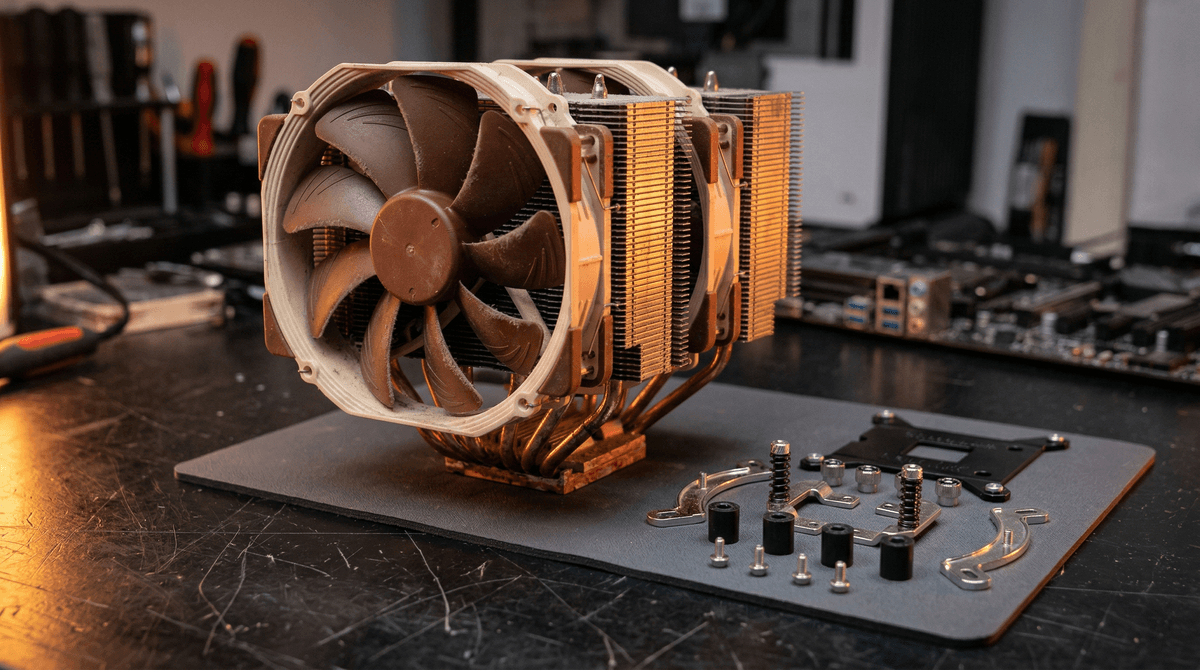
- Mounting hardware: this is the critical one. Verify that the seller includes all mounting brackets and screws for your specific socket. Many used coolers arrive without the original backplate or with only one socket's hardware. A missing bracket kit typically costs £5–£15 to source, but some older brackets are no longer manufactured.
- Base plate condition: the contact base should be clean or easily polishable. Old dried thermal paste is normal — you'll replace it anyway. Deep scratches on the copper base from over-tight mounting can reduce contact quality.
Checking a used AIO liquid cooler
AIOs require a more systematic inspection because their failure modes are less visible and more consequential:
- Radiator condition: check for any signs of external corrosion, lime-scale deposits on fittings, or discolouration stains around the tube connections — these are signs of past leaks or coolant degradation. Fins should be straight; bent radiator fins are harder to fix than heatsink fins.
- Pump noise: ask the seller to connect the unit and confirm the pump spins up. A healthy pump is audible as a faint, consistent hum with no grinding or rattling. Any irregular noise suggests bearing wear. A silent pump that should be running is a failed pump.
- Tube integrity: kink marks or perma-bent tubes that have been trapped under other components can restrict coolant flow permanently. Tubes should be flexible and free of flat spots. Rubber tubing on older AIOs can harden and crack over time.
- Coolant colour: most AIOs use clear or lightly tinted coolant. Dark brown, green, or murky coolant (visible in some AIOs with translucent tubes) indicates oxidation or biological growth. Not a dealbreaker, but suggests the user didn't maintain the unit.
- Age question — ask directly: a used AIO under 2 years old from a reputable brand is a confident purchase. Between 2–4 years, it's still reasonable. Beyond 4 years of regular use, approach cautiously — you're buying into a component that may have only a year or two of pump life remaining.
Cheap generic AIOs: avoid used. Budget 240mm AIOs from unknown brands (common on Amazon Marketplace at £25–£40 new) often use low-quality centrifugal pumps with rated lifespans of 2–3 years under normal use. Buying one used at year 2 means you may be inheriting a pump months from failure — with a CPU attached.

Inspect the tube fittings and radiator fins for discolouration or residue — signs of past coolant issues or minor leaks.
Socket compatibility — the critical check
This is where most used CPU cooler purchases go wrong. A cooler that works perfectly on AM4 may be physically incompatible with AM5 without an adapter bracket. Some coolers come with universal mounting kits; many used examples arrive with only the hardware that was installed.
Here are the active sockets in 2026 and what you need to know about mounting compatibility:
| Socket | Platform | Mounting Notes |
|---|---|---|
| AM4 | AMD Ryzen (1000–5000 series) | Massive used cooler supply. Most quality coolers from 2017+ include AM4 brackets. Verify the AM4 backplate is included — it differs from the stock AMD backplate. |
| AM5 | AMD Ryzen (7000 series+) | Uses a new mounting standard. Many older coolers require a separate AM5 bracket kit (£5–£15). Check manufacturer compatibility list. Noctua and be quiet! provide free AM5 upgrade kits for registered owners. |
| LGA 1700 | Intel 12th / 13th / 14th Gen | Intel's current mainstream socket. Requires specific LGA 1700 brackets — some older coolers need an upgrade kit. Verify the seller includes LGA 1700 hardware specifically. |
| LGA 1200 | Intel 10th / 11th Gen | Compatible with LGA 115x brackets in most cases. Very common on older used coolers. If buying a cooler for LGA 1200, nearly any quality cooler from 2015+ will work. |
| LGA 1151 | Intel 6th–9th Gen | Uses LGA 115x mounting — same as LGA 1200. Hugely common bracket; almost every quality used cooler will include this. Low risk of missing hardware. |
Always confirm with the seller which mounting hardware is included. Ask specifically: “Does this include the bracket and backplate for [your socket]?”
Pro tip: If you buy a used cooler missing the bracket for your socket, check the manufacturer's website before giving up. Noctua, be quiet!, and Cooler Master all sell replacement mounting kits individually. Noctua's SecuFirm2 kits for AM5 and LGA 1700 are available for £5–£8 directly from their site — making an otherwise incompatible used cooler instantly viable.
Best used air coolers to target in the UK (2026)
These models represent genuine value in the second-hand market — either because their thermal performance remains competitive, because their build quality means a used example will last another decade, or both.
Noctua NH-D15
The most recommended air cooler in PC building history for good reason. Dual-tower design with six heat pipes delivers performance that rivals 240mm AIOs. A used NH-D15 in good condition with mounting hardware for your socket is an outstanding buy — Noctua fans have documented lifespans exceeding 150,000 hours. Check that the NF-A15 fans are included (they retail alone for £20+ each).
be quiet! Dark Rock Pro 4
A serious dual-tower cooler with excellent fan quality and a distinctive all-black aesthetic. The be quiet! fans are among the quietest in the industry. Buy used only if the 135mm and 120mm fans are both included — they're proprietary and not easily swapped for standard fans without adapters.
Cooler Master Hyper 212
The most common mid-range air cooler in existence. Hundreds of thousands circulate in the used market. Performance is solid for mid-range CPUs (sufficient for Ryzen 5 5600, Core i5-12400). At these prices, even if you need to replace the fan, you're still well ahead. No single-tower cooler at this price range competes with it used.
Noctua NH-U12S / NH-U14S
Single-tower Noctua models offering excellent clearance for tall RAM and a lower profile than the NH-D15. The NH-U14S uses a 140mm fan and punches well above its category. Same build quality logic applies: a used Noctua fan cooler is a near-zero-risk buy.
be quiet! Dark Rock 4 / Slim
Single-tower variant with very strong thermal performance for a single-tower design. Particularly well-suited for builds with RAM clearance constraints. Common in used listings as people upgrade to dual-tower designs.
Best used AIO coolers to target in the UK (2026)
AIOs require more care when buying used, but quality models from established brands are still excellent value. Focus on age and brand first — pump design and materials quality are what separates a 5-year investment from a 1-year gamble.
NZXT Kraken X63 / X73
NZXT Kraken AIOs use Asetek 7th generation pump heads — among the most reliable pump designs available. Excellent radiator quality, good fan quality, and solid software support. A used Kraken under 3 years old is a confident buy. The infinity-mirror head design means a scratched pump head cover is purely cosmetic.
Corsair H100i / H115i (Gen 3+)
Corsair's iCUE line uses Asetek pump heads for higher-end models. The H100i (240mm) and H115i (280mm) use proprietary fans that are decent but replaceable. Confirm the model number — older H100i variants (pre-Gen 3) use less reliable pump designs. iCUE software isn't required for cooling performance, just RGB control.
DeepCool Castle / LT520
DeepCool's higher-end AIOs use self-developed pump designs that have proven reliable over 3–5 year windows. Less common in the used market than NZXT or Corsair, meaning less risk of over-aged examples. The LT520 in particular is a capable 240mm unit with a clean aesthetic.
Arctic Liquid Freezer II 240/360
The Arctic Liquid Freezer II is unusual in the AIO market: it has a pump mounted in the radiator rather than the head, reducing neck stress on tubes. Exceptional thermal performance per pound at new prices — and even better value used. The VRM fan on the pump head is a bonus for motherboard cooling.
Avoid: cheap no-brand AIOs used
Generic 240mm AIOs sold under names like “ID-Cooling” budget lines, Pccooler, or unbranded Amazon units are not worth buying used. These units often use low-quality pumps rated for 2–3 years under normal use. Buying one second-hand at year 2 or 3 means inheriting an imminent failure risk. At new prices they can make sense for budget builds — used, they do not.
Avoid: coolers missing mounting screws
A cooler without its mounting screws is not just incomplete — it can be dangerous. Improvising mounting with wrong-spec screws can crack a CPU socket, strip threads, or result in an insecure installation that causes the cooler to come loose under vibration. Always verify the complete mounting kit is present before paying.
How to test a used CPU cooler after installation
Testing a CPU cooler is straightforward. Unlike RAM or GPU testing, you don't need specialist software — just a stress test and a temperature monitoring tool.
Apply fresh thermal paste
Always replace the thermal paste on a used cooler. Old paste becomes dry, chalky, and significantly less effective over time. Clean both the CPU IHS and cooler base with isopropyl alcohol (90%+) and apply a fresh pea-sized dot of quality paste (Noctua NT-H1, Arctic MX-4, or similar). This step alone can drop temperatures by 5–15°C compared to running dried-out OEM paste.
Open HWiNFO64 and note idle temperatures
Download HWiNFO64 (free). Open it in Sensor-only mode and note the CPU temperature at idle (desktop, no applications running). Expect 28–40°C idle for most CPUs at room temperature. Anything above 50°C idle suggests a mounting issue, poor thermal contact, or inadequate airflow in your case.
Run Prime95 (Small FFTs) for 15–20 minutes
Prime95's Small FFTs test is the hardest CPU stress test available — it maximises heat output beyond what any real workload generates. Run it for 15–20 minutes with HWiNFO monitoring. A well-installed air cooler should keep a mid-range CPU (Ryzen 5 5600, Core i5-12400) below 85°C. A 240mm AIO should keep the same CPU below 75–80°C. If temps are higher, check mounting pressure and thermal paste spread.
Check fan speed and noise under load
HWiNFO will report fan RPM. Confirm the fan is spinning up under load (some fans use zero-RPM modes at idle). Listen for bearing noise — a healthy fan should be aerodynamic wind noise only, not rattling or grinding. If a fan is noisy, it can almost always be replaced cheaply.
For AIOs: confirm pump is running
You should be able to feel a faint vibration from the pump head or tubing when the system is running. HWiNFO will show the pump RPM if your AIO reports it over USB. Pump speed should typically read 1500–3000 RPM at load. A pump reading of 0 RPM or very low RPM (below 500) while temps are rising indicates pump failure — do not continue running the system.
Thermal paste: always replace it
This is not optional. Any used cooler — regardless of how recently it was last used — should have its thermal paste replaced on installation. Thermal paste cures and dries over time, developing air pockets and cracks that significantly reduce thermal conductivity. Dried paste from 2 years ago is noticeably worse than fresh paste.
The practical protocol:
- Clean the CPU IHS (the metal lid) with a lint-free cloth and isopropyl alcohol (90%+ concentration). Remove all old paste completely.
- Clean the cooler base plate the same way. On a copper base, the surface should be clean and slightly reflective.
- Apply a pea-sized amount of quality thermal compound to the centre of the CPU IHS. Do not spread it manually — mounting pressure will distribute it correctly.
- Mount the cooler following the manufacturer's torque pattern (diagonal cross-tightening, not circular) to ensure even pressure distribution.
Recommended pastes for UK buyers: Arctic MX-6 (~£6), Noctua NT-H1 (~£7), and Thermal Grizzly Kryonaut (~£10 for 1g). All are excellent non-conductive compounds that are safe for all-day application. Avoid liquid metal on standard air coolers unless you are comfortable with the application — it is conductive and catastrophic if it bridges CPU socket contacts.
Used CPU cooler prices in the UK (2026)
These are realistic completed-sale prices for used CPU coolers in the UK as of early 2026. Prices vary based on included accessories, condition, and whether original packaging is present. Koukan and eBay UK completed listings are the most useful data sources for current market rates.
| Category | Examples | Used Price (UK) |
|---|---|---|
| Budget air (single-tower, budget brand) | CM Hyper 212, Arctic Freezer 34 | £8 – £20 |
| Mid-range air (single-tower, quality brand) | Noctua NH-U12S, be quiet! Dark Rock 4 | £20 – £35 |
| Premium air (dual-tower flagship) | Noctua NH-D15, be quiet! Dark Rock Pro 4 | £35 – £55 |
| Budget AIO 120/240mm (generic brand) | Zalman, ID-Cooling budget range | £10 – £25 |
| Mid-range AIO 240mm (quality brand) | Corsair H100i, DeepCool LT520 | £30 – £55 |
| Premium AIO 240/280mm | NZXT Kraken X63, Arctic LF II 240 | £45 – £70 |
| Premium AIO 360mm | NZXT Kraken Z73, Corsair H150i | £55 – £90 |
Prices based on completed UK sales, April 2026. Budget AIO entries are included for reference — we recommend targeting quality-brand AIOs only when buying used.
At these prices, buying a used premium air cooler like the Noctua NH-D15 at £40–£55 instead of new at £90–£100 saves you 40–55% with zero meaningful performance difference. For budget builds, the Hyper 212 at £10–£15 used is a no-brainer for any system that needs better than stock cooling.
Where to buy a used CPU cooler in the UK
Platform choice matters more for AIOs than it does for air coolers. For an air cooler, postal purchases are low risk — the heatsink is robust and easy to pack. For an AIO, local collection is strongly preferred: you can test it, listen to the pump, and inspect the tubing on the spot before money changes hands.
Koukan
RecommendedPurpose-built for UK PC parts. Sellers on Koukan understand the components they're listing — you can ask directly about socket hardware, pump condition, and age, and expect a technically literate answer. Buyer protection means you're covered if a cooler arrives described differently than listed. For AIOs, message the seller to request a short video of the pump spinning before purchasing.
Best for: Air coolers by post, AIOs from local sellers, specific socket compatibility questions.
eBay UK
Large selection but more variable listing quality. For air coolers, eBay is fine — filter by completed sold listings to sense-check prices before bidding. For AIOs, be more cautious: avoid posted AIOs where you can't verify pump condition. eBay Money Back Guarantee provides some cover, but return shipping for a heavy AIO can eat into your savings.
Best for: Air cooler bargains, competitive bidding on well-photographed listings.
Facebook Marketplace / local collection
The best option for AIOs specifically — you can inspect and test on the spot. Prices are often below eBay because sellers want a fast sale without posting hassle. No buyer protection, so take cash or use PayPal Goods & Services if purchasing remotely. Inspect the AIO thoroughly before handing over money.
Best for: AIOs where local collection lets you test before buying.
For a complete breakdown of where to buy all PC parts used, see our guide to buying used PC parts safely in the UK. If you're putting together a full used-parts build, read: how to build a gaming PC entirely from used parts.
Frequently asked questions
Is it safe to buy a used CPU cooler?
For air coolers, yes — they are one of the safest PC components to buy used. The heatsink and heat pipes don't degrade with use, and a worn fan can be replaced cheaply. For AIOs, the answer is “yes, with due diligence”: stick to quality brands under 3 years old, ask about pump condition, and prefer local collection so you can test before buying.
Will my old cooler fit my new CPU socket?
Not necessarily. Socket compatibility is the most common issue with used cooler purchases. Check the manufacturer's compatibility list before buying — then confirm with the seller that the appropriate bracket hardware is included. Moving from AM4 to AM5, or from LGA 1200 to LGA 1700, requires a new mounting kit even if the cooler itself is compatible.
How do I know if a used AIO pump is still healthy?
Ask the seller to test and video the system running, with HWiNFO showing pump RPM and CPU temperatures. A healthy pump runs at 1500–3000 RPM consistently and produces a faint, steady hum. Listen for grinding, irregular noise, or a pump that struggles to maintain RPM. If the seller can't provide this evidence, treat the AIO as high-risk and price accordingly.
Do I need to replace thermal paste on a used cooler?
Yes, always. Old thermal paste dries out and loses thermal conductivity significantly over time. Even if the cooler was “barely used”, paste begins degrading as soon as it's applied. Clean both the CPU IHS and cooler base with isopropyl alcohol and apply fresh paste every time you install a used cooler. Arctic MX-6 and Noctua NT-H1 are the standard recommendations for UK buyers.
Is an air cooler or AIO better value used?
For most UK buyers, a used premium air cooler offers the best value. A used Noctua NH-D15 at £40–£50 rivals the thermal performance of a new 240mm AIO at full price — with zero mechanical risk. AIOs are worth buying used specifically when you need the aesthetic, need a low-profile or cramped case option, or want a 280/360mm radiator that would be prohibitively expensive new.
What are bent heatsink fins and does it matter?
Heatsink fins are the thin metal plates that dissipate heat from the heat pipes into the air. Bent or crushed fins reduce the effective airflow surface area of the cooler. Even a small number of bent fins can measurably increase temperatures — sometimes by 5–10°C in extreme cases. You can carefully straighten bent fins with a thin flat tool (a butter knife or guitar pick), but ask for photos before buying and factor damage into your offer price.
Building a full PC from used parts? Read our complete used parts gaming PC build guide.
Advertisement