How to Spot a Fake Graphics Card on UK Marketplaces (GPU-Z Checks & Flashed BIOS)
Advertisement
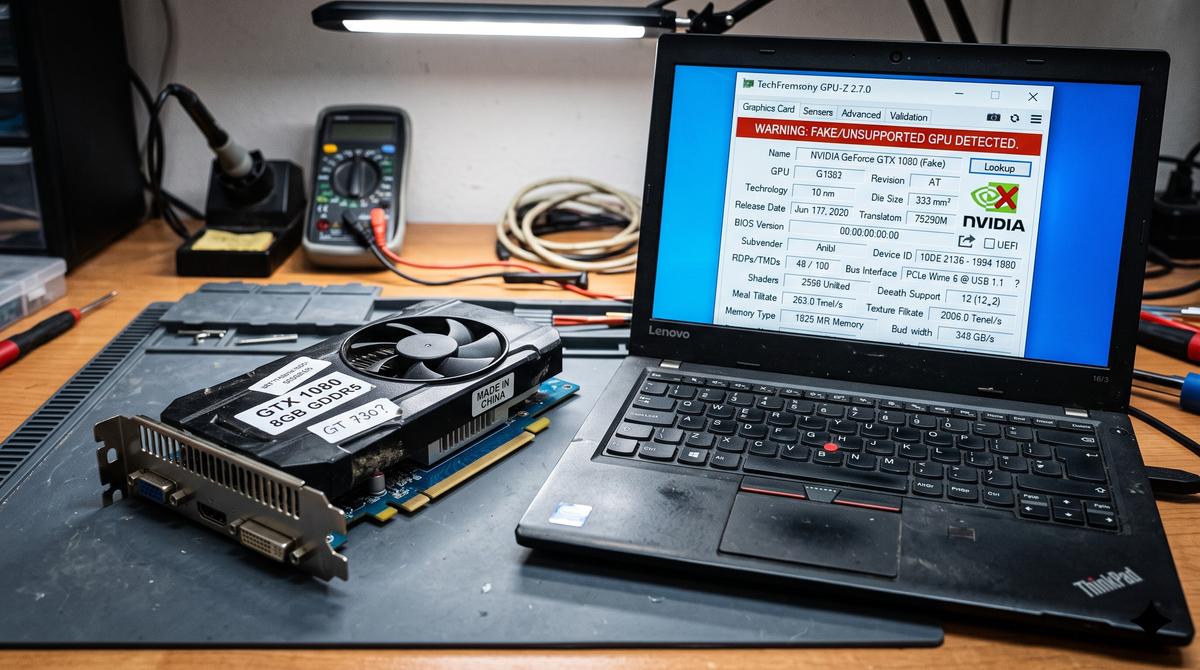
With graphics cards remaining the single most expensive component in any gaming PC, fraudulent sellers on unverified UK platforms like Facebook Marketplace, Gumtree, and unvetted eBay listings continue to exploit budget builders. The most common scheme involves taking ancient 15-year-old GPUs—such as the NVIDIA GeForce GTS 450 or GTX 550 Ti—flashing a hacked video BIOS (VBIOS) onto the EEPROM chip to display "GTX 1060" or "RTX 3060" in Windows, and selling them for £50 to £100.
When inserted into your PC, Windows Device Manager will happily report the card as a genuine GTX 1060. However, the moment a game requests DirectX 12 instructions or tries to write beyond the physical 1GB of VRAM, the driver crashes violently with a blue screen. In this forensic hardware guide, we explain the unmistakable physical tells, software verification tools, and diagnostic tests to ensure you never get scammed.
1. Physical Hardware Red Flags: The Dead Giveaways
Before plugging a suspicious card into your PCI Express slot, scrutinise the physical board. Scammers rarely bother replacing the underlying heatsinks and display outputs of their ancient donor cards:
NVIDIA removed native analogue display controllers from their silicon starting with the GeForce GTX 10-series (Pascal) in 2016. No genuine GTX 1060, 1070, 1660, or RTX card has ever been manufactured with an analogue blue 15-pin VGA port. If a listing claims to be an RTX or GTX 10-series card and features a blue VGA port, it is 100% counterfeit.
Counterfeits almost always use generic circular plastic fan stickers without manufacturer logos (no ASUS, MSI, Gigabyte, EVGA, Zotac, or Palit markings). The shroud is typically cheap injection-moulded black plastic with random red racing stripes.
Virtually all modern consumer graphics cards manufactured in the last 8 years use multi-layer matte black printed circuit boards. Cheap bright blue or faded green PCBs are characteristic of mid-2000s Fermi and Kepler era cards.
Legitimate modern cards use heat pipes running through thin stacked aluminium fin arrays. Counterfeits use an old single-piece radial extruded circular heatsink (resembling an old Intel stock CPU cooler) hidden behind a dual-fan shroud.
2. Software Verification: GPU-Z Fake Detection
Since version 2.12.0, TechPowerUp's free GPU-Z utility includes automated heuristic detection for hacked VBIOS strings.
How GPU-Z Flags a Counterfeit Card
When GPU-Z reads the hardware device ID and finds a mismatch between the reported name in the VBIOS and the actual silicon architecture (e.g., GF106 Fermi silicon reporting as GP106 Pascal), it prepends the name with [FAKE] in bright bold letters and replaces the NVIDIA icon with a yellow exclamation hazard badge.
GPU Die: GF106 (40nm) — Actual Shaders: 192 Unified (Genuine 1060 has 1280)
3. What to Do If You Bought a Fake Card in the UK
If you purchased the card online in the UK:
- eBay Purchase: File a dispute under "Item Not as Described" (INAD). eBay Money Back Guarantee strictly prohibits counterfeit goods; upload a screenshot of GPU-Z showing the [FAKE] flag. The seller must pay return shipping or issue an immediate refund.
- PayPal Goods & Services: Open an escalated dispute providing the GPU-Z diagnosis. Counterfeit electronics violate PayPal Acceptable Use Policy.
- Facebook Marketplace / Gumtree Cash: Private sales paid via cash or bank transfer offer virtually zero legal recourse unless you can prove criminal fraud under the Fraud Act 2006. Never pay cash for unverified computer hardware.
Buy with 100% Protection on Koukan
Avoid fraudulent sellers and counterfeit silicon. On Koukan, every seller is vetted, payouts are held in escrow until you verify the hardware in your system, and fake hardware is strictly blocked.
Advertisement